What to Check, What to Leave Alone, and When It's a Safety Issue
A solar system that has gone completely dark, or a situation where your solar breaker keeps tripping no matter how often you switch it back on, is one of the most stressful problems an Arizona owner can face. The system is supposed to run quietly on your roof and cut your bill. Instead, the display is blank, the app shows zero, or you are walking to the breaker box for the third time this week. Meanwhile your home keeps drawing grid power, and every day the system stays down is a day of production you will not get back.
The good news is that the first few checks take minutes and need no tools. The better news is that most owners can sort out which of two situations they are in. "Completely down" means there is no output and no power at the unit. “Tripping” means your solar breaker keeps tripping: the system runs for a while, then the breaker drops. They have different causes and different urgency, and a third situation, a sizzling breaker, burnt wiring or a fire event, is a safety issue that sits above both.
Arizona makes all three more likely. Afternoons pass 100°F just as your system reaches peak output, so breakers, connections and wiring are carrying their heaviest load at their hottest. Years of daily heating and cooling loosen connections. Monsoon moisture finds its way into enclosures. And many systems are now old enough that the person who installed them is gone. Owners tell us their system has been down for weeks because their installer closed, or because a manufacturer's service team could not visit until months later. That is the gap this guide fills: the solar service company you can still call years later.
This guide splits the work in two. Your job is to observe, isolate, record and route. The technician's job is the diagnosis and the repair. If you do your part well, the repair is faster, safer and easier to claim under warranty.
Do these three things today:
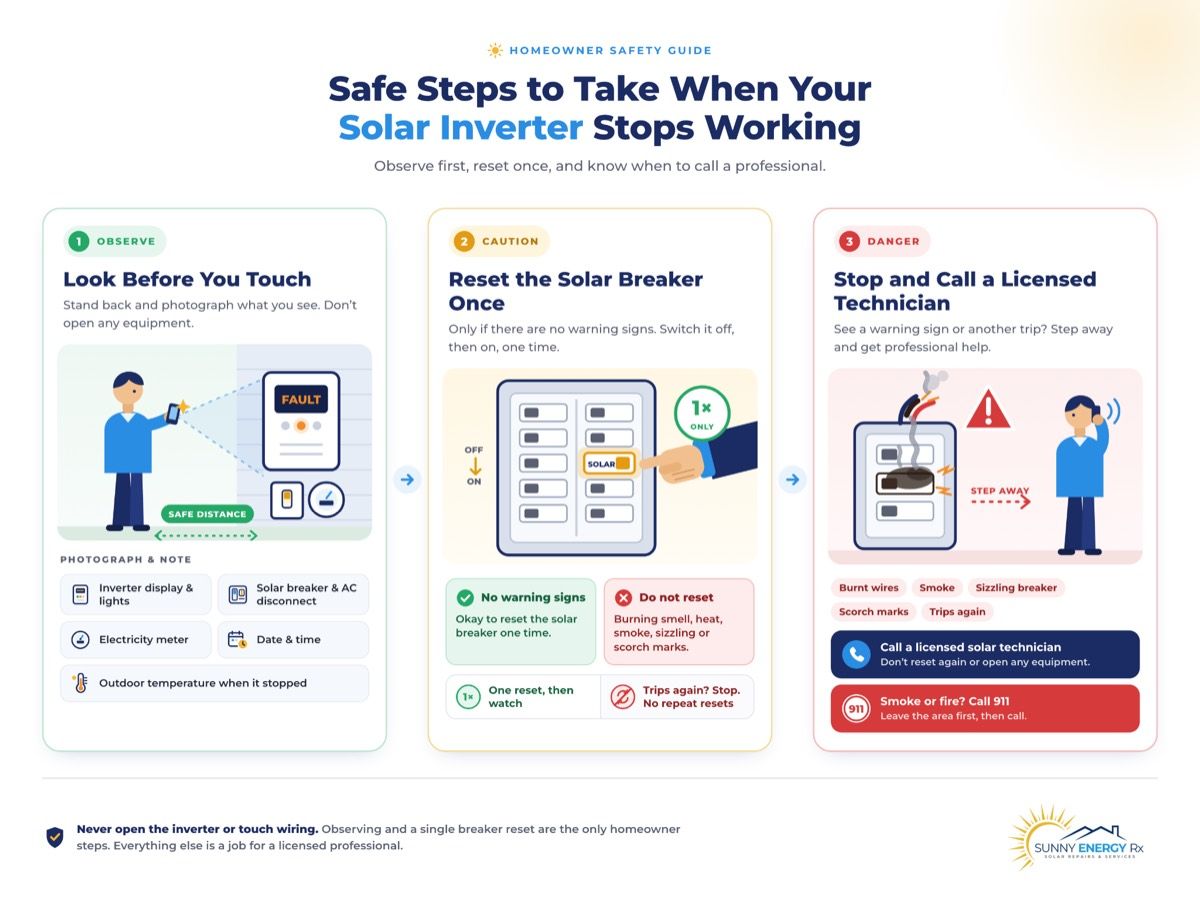
Look before you touch. Photograph the inverter display, the lights, the solar breaker, the AC disconnect and the meter. Note the date, the time and the outdoor temperature when it went down.
Reset the solar breaker once, only if there is no burning smell, heat, sizzling, scorch marks or smoke. If your solar breaker keeps tripping, leave it off. Never reset it repeatedly.
Burnt wires, a sizzling breaker, smoke or a fire event: stop. Leave the system off and keep clear. Call 911 for smoke or fire, then call a licensed technician.
If your solar system is completely down, check the inverter display, the solar breaker and the AC disconnect, and photograph all three. Reset the breaker once if there's no heat, smell or scorching. If your solar breaker keeps tripping, or you see burnt wires or any fire event, you need a licensed technician before the system runs.
Two explainers come next, because most of the confusion in this problem comes from not knowing where things are and not knowing why breakers trip.
Explainer: Why Solar Systems Go Down and Breakers Trip in Arizona
A breaker is a safety device. Its job is to drop out when something is wrong, so a tripping breaker is information, not just an annoyance. Most systems do not fail with a bang. They fail quietly, and a breaker trip is often the first sign.
Why your solar breaker keeps tripping: the four common causes
The breaker itself is worn or overheating. Breakers age, and one that has carried peak summer loads for a decade, or has tripped many times, can trip more easily than a new one.
A loose or heat-cycled connection. Connections expand and contract every day. Over years, a connection can loosen, create resistance and generate heat at exactly the point where the wire meets the breaker. It runs hotter until a breaker or fuse gives up.
A ground or arc fault. Damaged wiring or insulation lets current go where it should not.
The inverter pushing too much current. This is less common, but a technician checks inverter output under load to rule it out.
Why Arizona systems fail quietly
Daily heat cycling, dust, monsoon moisture and aging hardware all wear on a system over time. Many Arizona systems are now past their first warranty window, and monitoring that once alerted the installer often stopped alerting anyone when the installer closed. Dust builds up in cooling vents, and monsoon nights leave moisture in enclosures that shows up as a fault the next morning.
Breaker size versus inverter size
One owner noticed that their inverter was rated 32 amps AC and sat on a 40-amp breaker, and wondered whether that mismatch was the problem. A breaker rated above the inverter’s continuous output is common and usually intentional, because installation rules size the breaker with headroom above continuous current.
The numbers alone do not prove a mistake. Do not change a breaker size yourself. Whether a breaker is correct for a given inverter is a question for the installation instructions and a licensed technician.
Why it matters for your bill
A system can sit down for weeks before the bill shows it. A tripped breaker in July can mean a missing solar credit in August and a surprise in September. A monthly look at your app and your display is the cheapest protection you have, and professional monitoring can catch a trip for you.
With the vocabulary in place, the map below helps you match what you are seeing to the right section.
Situation Map: Find Your Problem Fast
Owners describe this problem in very different ways: a dark display, a breaker that will not stay on, an error that mentions the grid, a notice from the utility. Find your row, then jump to the numbered section. Rows 3 and 5 are safety situations, marked with a red flag (🚩) so you see them first. Row 2 carries an amber flag, because a repeat trip can turn into a row 3 situation.
# | What you're seeing | What it usually means | First move this week | Go to |
1 | Whole system dead, no power at the unit or the meter | Upstream power loss, a tripped or open disconnect, or a failed unit | Photograph display, breaker and disconnect; check once | Section 1 |
2 🟠 | Solar breaker keeps tripping, including afternoons or above 100°F | Overload, a failing breaker, a loose termination, heat stress or a ground fault | Reset once at most; log the time and temperature of each trip | Section 2 |
3 🚩 | Sizzling breaker, burnt wires, scorching | Overheated connection; a fire risk | Stop. Leave it off. Call a technician | Section 3 |
4 | "Missing grid" or "No grid" error, yellow or orange alarm | The inverter can't see utility power | Run the section 1 checks; record the error | Section 4 |
5 🚩 | Fire, electrical panel fire, or the meter collar was removed | Damaged wiring, a utility disconnect, or a system that needs inspection | Do not restart. Get it inspected | Section 5 |
6 | Brand-specific shutdowns (SolarEdge, Enphase, Tesla, SunPower) | Usually the inverter, gateway or breaker, not the panel brand | Use the brand's official restart steps only | Section 6 |
7 | Battery not charging or down; wanting to add one | A battery, gateway or inverter fault, or an expansion question | Record the battery error; no DIY | Section 7 |
8 | Installer is gone or bankrupt and the system is down | Equipment warranty may remain; the service contact is lost | Contact the manufacturer directly | Section 8 |
9 | APS, SRP or TEP says you aren't producing, or the bill is high | The system may have been down for weeks | Check the system, then the bill | Section 9 |
10 | Just bought a house with solar and it's dead | Unknown equipment, no records, maybe locked disconnects | Identify the system first | Section 10 |
11 | Down after a storm, window cleaning or other work | Disturbed wiring, water ingress, or a coincidence | Record the dates; book a diagnostic | Section 11 |
Need help now? Sunny Energy RX offers Solar System Diagnostics and Repair for systems from any installer. Call 480-470-1023.
Most people reading this have one question first, so we start there.
1. ENTIRE SYSTEM DOWN: THE FIRST CHECKS
My Entire Solar System Is Down. What Are the First Checks?
Quick Answer: Start by finding out whether the whole house has lost power, because a utility outage looks like a dead solar system. If the house has power, photograph the inverter display, the solar breaker, the AC disconnect and the meter. Reset the solar breaker once if there is no heat, smell or scorching. If it stays dead, book a technician. |
What You're Seeing
"We have no power to any of the solar components, including the meter." "No power from the unit." "The system has been down for three days." "I did a complete system reset and it won't come back." "Solar panels not working."
What's Actually Happening
"System down" can mean three different things, and the first check is working out which one you have:
The home has lost power. A utility outage or a main breaker problem takes the solar system with it. If there is no power at the meter, the cause is the utility or the main service, not the solar equipment.
Power is not reaching the inverter. A tripped solar breaker or an open AC disconnect cuts the inverter off from the grid. The inverter shuts down because it has nothing to connect to.
The inverter itself has failed. A dead display, no lights and a breaker that is on can point to a failed unit or board.
The table below sorts what you see into the right section.
What you see | Go to |
The whole house has no power, or no power at the meter | Call the utility first; the solar is not the cause |
Solar breaker keeps tripping | Section 2 |
Sizzling, burnt smell or scorched wires | Section 3, and stop |
Display shows "missing grid" or "no grid" | Section 4 |
A fire or the utility pulled the meter collar | Section 5 |
Battery or gateway involved | Sections 6 and 7 |
The Arizona factor is that systems here tend to go down quietly. A breaker trips on a 112°F afternoon, nobody notices, and the first sign is a bill weeks later. If your system went down during or after a monsoon storm, check whether the neighborhood lost power too.
Here is what to do, in order.
The Fix
Check the rest of the house. Do lights, outlets and the air conditioner work? If the whole house is without power, contact the utility. If only the solar equipment is dark, continue.
Look at the meter. If the meter shows nothing at all, the problem is upstream of your solar. Photograph it and call the utility.
Read the inverter. Photograph the display and every light. Note whether it is blank, showing an error or stuck in "waiting." A dark display at night is normal; check again at midday.
Look at the solar breaker and the AC disconnect. From a safe position, note whether each is on, off or tripped. If the breaker is tripped and there is no heat, smell or scorching, reset it once.
Check the app. Does it show zero, an alert or no connection? Screenshot it with the date.
Book a technician if it stays dead. If the system is still down through the next sunny midday, call and send your photos, timeline and notes.
Warranty Considerations: Opening any enclosure can put manufacturer warranty coverage at risk, so photograph and report instead. Terms vary by brand, model and registration.
Field note: One Glendale homeowner saw their system drop offline in early July, performed a complete system reset and found it would not come back. A reset that does not restore the system is useful information. Report it to the technician along with the date, rather than trying further resets.
Check whether the whole house has power, then the meter, the inverter display, the solar breaker and the AC disconnect, in that order. Photograph each one for your technician, and reset the breaker once at most. Never open any enclosure.
Follow only the owner steps in your manufacturer’s manual, which usually means a single breaker reset. Never open the enclosure. If the system does not restart after that, stop there and book a licensed technician rather than trying repeated resets.
Normally no. Most grid-tied inverters shut down during an outage for safety and restart on their own when grid power returns. If yours stays off after power is restored, something else is wrong, so have a licensed technician check it.
Start with the utility if the whole house is dark. If only the solar is down, call a licensed solar repair technician, even if they did not install your system. Have your photos and inverter display readings ready to speed diagnosis.
Usually on an exterior wall near the meter, and in the main or solar sub-panel inside. Look for labelled switches marked solar, PV or AC disconnect. See Explainer A above for how to find each one. Never open any enclosure yourself.
How Sunny Energy RX handles this: Our Solar System Diagnostics visit works out whether the problem is the utility, the breaker, the wiring or the inverter, backed by 17+ years of Arizona solar experience, and tells you what failed before any repair starts. See also our inverter troubleshooting guide for what each display and light means.
If the system will not stay on because your solar breaker keeps tripping, the next section is for you.
2. SOLAR BREAKER KEEPS TRIPPING (INCLUDING IN THE HEAT)
Why My Solar Breaker Keeps Tripping, Especially Over 100°F, and Is It Safe to Reset?
Quick Answer: When your solar breaker keeps tripping, it is protecting something. The cause can be a worn breaker, a loose or heat-stressed connection, a wiring fault or an inverter problem, and heat makes all of them worse. Reset it once, only if there is no heat, smell or scorching. If it trips again, leave it off and book a technician. |
Before you reset (is it safe to reset solar breaker equipment right now?), and look and smell for scorching, melted plastic or a sizzling sound. Any of those means do not reset. Go straight to section 3.
What You're Seeing
“Solar breaker tripping repeatedly.” “The breaker in the separate solar electrical box keeps tripping and we have to turn it back on.” “It trips when temps get over 100 degrees. If I flip it back on, it seems fine until it trips again.” “That breaker has tripped more than once.” One owner simply wrote: “fuse issue.”
What's Actually Happening
A breaker trips for one of four reasons, covered in Explainer : the breaker is worn, a termination is loose, there is a ground or arc fault, or the inverter is pushing too much current. If your solar breaker keeps tripping, you cannot tell which cause it is from the outside, and the pattern of trips is the best clue you can give a technician.
One owner with a two-inverter system showed how useful that pattern can be. The first inverter's breaker tripped more than once, and after each reset the inverter came back and the combined system produced around 11 to 12 kW. The second inverter, on its own breaker, never had the problem. That detail matters, because it points the technician at one circuit instead of the whole system. When you have two inverters, or two breakers, tell the technician which one trips and which one does not.
Solar breaker tripping in heat: When it trips in the afternoon or over 100°F
Arizona adds a second layer. Your panels produce the most in the afternoon, and that is also when the air is hottest. A breaker carrying its heaviest load inside a hot enclosure can trip at a load it handles easily in March. Connections that have heated and cooled every day for ten years can loosen, and a loose connection creates resistance and more heat. Fans, derating and shade all play a part, and none of them is something you can fix from the ground.
The most useful thing you can contribute is a log: the time of day and the outdoor temperature at each trip. A system that only trips above 105°F tells a technician something very different from one that trips at random. Please do not add shade covers, fans or other modifications. Airflow and clearance rules are set by the manufacturer, and an add-on can make heat worse.
What a technician checks
The owner with the two-inverter system asked for the right list, and it is the one a technician follows: the breaker itself, the terminations, the wiring and the inverter output under load. Each one can only be tested safely by a licensed professional with the right equipment. A solar inverter tripping breaker is not always the inverter’s fault, which is why a diagnostic comes before a replacement.
The Fix
Look and listen first. Check for heat, smell, scorch marks and sizzling from a safe distance. If you find any, stop and go to section 3.
Photograph the breaker position. Note whether it is fully off, in the middle or on, and photograph the inverter display and lights.
Reset once. If everything looks and smells normal, reset the breaker one time and note the date and time.
Log each trip. Write down the time, the outdoor temperature and whether the inverter came back normally.
If it trips again, leave it off. A second trip is a real fault, not a glitch. Do not try again.
Book a technician. Send your photos and your log, and mention which breaker or inverter is involved.
Warranty Considerations: Replacing a breaker or opening an enclosure yourself can put manufacturer warranty coverage at risk. Keep dated records of every trip, because a documented pattern helps any claim.
Field note: One owner’s inverter breaker tripped repeatedly while the second inverter’s breaker never did. Because only one circuit was affected, the owner asked a technician to check the breaker, terminations, wiring and inverter output under load. A trip pattern on one circuit narrows the search.
Field note: Another Gilbert owner had a solar breaker tripping in heat: it tripped only when temperatures passed 100°F, then worked normally after a reset until the next hot spell. That is a heat-linked pattern, and the temperature log is exactly what a technician needs.
Reset it once, and only if there is no heat, smell, sizzling or scorching. If it trips again, leave it off and call a licensed technician. Repeated resets can hide a fault and put extra stress on the breaker.
Yes. Hot enclosures reduce a breaker's tolerance, and Arizona afternoons combine peak solar output with peak heat. A technician can tell whether heat is the main trigger or is simply making another underlying fault worse over time.
Afternoon is when your system produces the most power and the day is at its hottest. Both raise the load and temperature on the breaker and its connections. Log the time of each trip so your technician can spot patterns.
Not necessarily. The breaker itself, a loose connection or faulty wiring can trip without the inverter being at fault. A technician tests each part separately before recommending a replacement, which can save you from an unnecessary and expensive inverter swap.
It depends on the inverter and the installation instructions, with the breaker normally sized above the system's continuous output. Don't change or swap it yourself. A licensed technician should confirm the correct rating, since the wrong size creates real safety and fire risks.
Causes include a grid event, heat, a wiring fault or a breaker problem. Photograph the display and any error code, and log the time it happens. See our inverter troubleshooting guide for what each code and light means.
How Sunny Energy RX handles this: When your solar breaker keeps tripping, our Solar System Diagnostics visits test the breaker, terminations, wiring and inverter output under load, so you learn which part is failing, backed by 17+ years in Arizona heat. See our maintenance guide for how heat wears on connections.
When your solar breaker keeps tripping and the trip comes with a sizzle, a smell or burnt wires, the situation changes completely.
3. SIZZLING BREAKER, BURNT WIRES OR SCORCH MARKS
My Solar Breaker Is Sizzling or There Are Burnt Wires. Is It Safe?
Quick Answer: No. A solar breaker sizzling, burnt wires or scorch marks mean something is overheating, which is a fire risk. Do not reset it and do not touch it. Leave the system off, photograph it from a safe distance, and call a licensed technician. For smoke or a burning smell, leave and call 911. |
What You're Seeing
“The solar breaker box has burnt wires and I don’t feel that turning the system back on would be safe.” “When we tried to turn the breaker back on, it was sizzling, so we turned it off.”
What's Actually Happening
A breaker should be silent. Sizzling, hissing or crackling means current is arcing or a connection is badly overheated. Burnt wires mean that has already happened. Common causes include a connection that loosened over years of heat cycling, a worn breaker, damaged insulation or a fault that tripped the breaker many times before it finally failed.
In Arizona, the risk is greater because the surrounding temperature is already high, and a connection that starts to overheat has less margin before it scorches. Turning the system back on adds current to a connection that is already damaged. That can make the damage worse, and it can start a fire.
Both owners in this situation did the right thing: they stopped. That instinct is correct, and this section exists to back it up. You do not need to find the cause. You need to keep the system off and get a professional to look.
The Fix
Leave it off. Do not switch the breaker back on to “test” it, and do not reset it, since doing so could worsen damage or start a fire.
Keep clear. Keep people and pets well away from the panel or sub-panel until a technician has checked it.
If there is smoke or a burning smell, leave and call 911. Do not use water on electrical equipment, as it can cause electric shock.
Photograph from a safe distance. Capture the panel, the breaker and anything visibly scorched, without opening a cover or moving closer than you need to.
Record the details. Write down the date, what you saw, smelled or heard, and how many times the breaker has tripped before.
Call a licensed technician. Tell them it involves burnt wires, solar breaker box damage or a sizzling breaker so they can prioritize it as an urgent safety issue.
Warranty Considerations: Do not open the enclosure or replace parts yourself. Doing so can put manufacturer warranty coverage at risk and can be dangerous. Photographs and dated notes support any claim.
Field note: Two owners separately found a sizzling breaker or burnt wires in the solar breaker box, and both left the system off. Neither tried further resets, and both asked for professional help. That caution is exactly right.
It usually means a connection is overheating or arcing. Do not touch it or reset it. Leave the system off and call a licensed technician right away. If you smell burning, leave the area and call 911.
Treat it as a serious safety issue. Burnt wiring means overheating has already occurred and could happen again. Keep the system off, stay clear of the panel, and book a licensed technician promptly to inspect and repair it.
A licensed electrician or solar technician with solar experience. Choose someone who will put their findings in writing and who is willing to work on systems they did not install, so you get an independent assessment.
How Sunny Energy RX handles this: Our licensed, bonded and insured technicians inspect burnt breakers and wiring, repair the cause and document what they found. If the burnt wiring followed a fire, go to section 5, and see our inverter guide for arc and ground faults.
A different safety situation involves fire or utility action rather than a breaker. First, one of the most common error messages on a dark system.
4. “MISSING GRID” OR “NO GRID”
Inverter Missing Grid or No Grid: What Does That Mean?
Quick Answer: An inverter missing grid message means the inverter cannot detect usable utility power, so it will not produce. The cause can be a utility outage, a tripped breaker, an open disconnect or a failed part on the AC side. Check the section 1 basics, record the message, and book a technician if it persists. |
What You're Seeing
“The system has a ‘missing grid’ error with the alarm light lit in yellow.” “The inverter is stuck on ‘Missing Grid’ with an orange alarm light.” “We’ve already run through the basic troubleshooting steps and we’re still seeing the error.”
What's Actually Happening
A grid-tied inverter works only when it sees valid utility voltage. If that voltage is missing, out of range or unstable, the inverter stops exporting. That is a safety feature, and it also protects utility workers during outages. “Missing grid” or “No grid” is the inverter telling you it cannot see the grid.
If the whole system is dark, start with the first checks in section 1. If the display is on and showing this message, the likely causes are:
A utility outage. If the neighborhood or house has lost power, the inverter is behaving correctly.
A tripped solar breaker or an open AC disconnect. The inverter is cut off from the grid on its own circuit.
A failed part on the AC side. A connection, a fuse or a component between the inverter and the grid may have failed.
One homebuyer who inherited an older system from the previous owner had confirmed the main solar breaker and the exterior disconnect were both on, was cutting off an old padlock for access, and wanted a paid diagnostic to see whether it was “a simple blown fuse or a dead inverter.” That is a reasonable hope, but internal fuses and terminal voltage are technician work. Opening the unit to look is not something to try.
Brand wording differs: some units say “No Grid,” others “Grid Missing” or a numeric code. Photograph the exact message and confirm its meaning in your manual. Our inverter guide holds the full code table.
The Fix
Check whether the house has power. If the utility is out, wait for restoration. Most inverters restart on their own.
Confirm the breaker and AC disconnect positions. Look from a safe position. If the breaker is tripped and there is no heat or smell, reset it once.
Photograph the display and alarm light. Capture the exact wording and the light color, since yellow and orange can mean different things by brand.
Record the details. Write down the date, the time and whether the message appeared after an outage, a storm or any work.
Don’t open anything or cut anything. Leave covers and enclosures closed.
Book a technician if it persists. Share your photos and what you have already checked.
Warranty Considerations: Internal repairs belong to the manufacturer or a certified technician. Terms vary by brand, model and registration.
Field note: A Chandler homebuyer with an older inherited system had verified the main solar breaker and the exterior disconnect were on, and still had a “Missing Grid” error with an orange alarm. Once the simple checks are done and the message remains, the next step is a diagnostic.
Sometimes. It means the inverter cannot see usable grid power. That can be a genuine outage, but it can also be a tripped breaker, an open disconnect or an AC-side fault, so check these before assuming the utility is to blame.
Yes. If the AC breaker or disconnect is off, the inverter loses its grid connection. Reset the breaker once if it is safe to do so, and book a licensed technician if it trips again.
The inverter shuts down when grid power is lost, by design, to protect utility workers. It should restart on its own after power returns. If it does not, something else is wrong and needs checking.
Only the basics: check for an outage, then the breaker and the disconnect. Anything inside the unit, including fuses and terminals, needs a licensed technician. Never open the inverter enclosure yourself, as it is unsafe.
A technician checks voltage at the inverter terminals, then the breaker, disconnect and wiring, and replaces whichever part has failed. The exact fix depends on what the testing finds, so repair cost and time can vary.
How Sunny Energy RX handles this: Our Solar System Diagnostics work on all major brands, testing the AC side step by step so you know whether it is a part or the unit. See section 1 for the first checks.
For the most serious situation of all, the system itself may have been near a fire.
5. AFTER A FIRE OR ELECTRICAL EVENT
There Was a Fire or Electrical Event. Is My Solar Safe?
Quick Answer: Do not restart anything that was near a fire or electrical event until it has been inspected. Fire can damage wiring that looks fine from outside. Leave the system off, keep clear, photograph the damage from a safe distance and call a licensed technician. Reconnecting also involves your utility. |
STOP AND CALL. Do not switch the system back on. Do not touch damaged wiring, the panel or the inverter. Smoke, a burning smell or sparking: leave and call 911. Then call a licensed technician for an inspection.
What You're Seeing
“Had a house fire and believe the wiring to the panels was damaged.” “I had an electrical panel fire. The utility shut off the power and removed the collar going to the solar. The company that installed my system is no longer in business. I’m looking for someone to reconnect it and make sure it’s OK.”
What's Actually Happening
Two questions often get mixed together here, so it helps to separate them.
Can solar panels catch fire? Rarely, but yes: any electrical equipment can, usually because of a faulty connection, damaged wiring or a failed component rather than the panels themselves. Systems that are installed and maintained properly are not a common cause of house fires. A brief, honest answer is better than alarm.
Is my system safe after this fire? That is a different question, and the answer is: have it inspected. Heat, smoke and water can damage wiring, connectors and the inverter in ways you cannot see. A system that worked before the fire may not be safe to run after it.
When a utility removes the meter collar, that is a safety disconnect. It isolates your home from the grid so nobody is exposed to live power. You cannot and should not re-energize it yourself. Reconnection needs a licensed inspection, and then the utility, which has its own process. If your installer closed, as in the second case above, you need a technician who works on systems they did not install.
The Fix
Do not restart anything. Leave the solar breaker, the AC disconnect and the inverter as you found them after the fire.
Keep clear. Do not touch damaged wiring, panels or equipment.
Photograph the damage from a safe distance. Capture the panel, the meter area, the inverter and any visible wiring damage.
Record the details. Note the date, what burned, who shut off power and any fire department or utility report numbers.
Book a licensed technician. Ask for a written inspection of the wiring and equipment before anything is reconnected.
Contact your utility. Ask what they need before reconnecting, and ask your technician to confirm it.
Warranty Considerations: Fire damage is usually handled through insurance rather than a manufacturer warranty. Equipment warranties may not apply, and terms vary. Keep every record.
Field note: After an electrical panel fire, the utility shut off power and removed the collar going to the solar system. The installer had closed, so the owner needed someone to inspect the system and reconnect it. A written inspection is the first step.
Insurance: Photos, dates, the fire report and a technician’s written findings are the documents an insurer will usually ask for. Ask your insurer directly what is covered. No guide can predict a coverage decision.
If the area is safe and you can reach the disconnect without risk, yes, and leave it off. Never go near damaged equipment. Call 911 first, then book a licensed technician to inspect the system before anything is switched on.
A licensed solar or electrical contractor, often alongside a local building or fire inspector. Ask for written findings for your records, and ask your utility what it requires before reconnection so the system is not restarted too early or unsafely.
Leave the area and call 911. Do not use water on electrical equipment. After the fire is out, keep the system off, stay clear of it, and call a licensed technician to inspect it thoroughly and confirm it is safe.
It depends on your policy and the cause of the fire. Ask your insurer promptly what it covers and what documents it needs. Keep photos, dates, receipts, the fire report and any written inspection findings to support your damage claim.
How Sunny Energy RX handles this: Our Solar System Diagnostics produce documented findings and photos for your insurer and utility, on systems we did not install. If the problem was a burnt breaker rather than a fire, see section 3.
If no fire is involved, many owners find the problem is tied to a specific brand, and each brand has its own way of shutting down and restarting.
6. BRAND-SPECIFIC SHUTDOWNS AND RESTARTS
Why Does My SolarEdge, Enphase, Tesla or SunPower System Shut Down?
Quick Answer: Shutdowns, including a solar inverter tripping breaker, are usually caused by the inverter, the gateway or the breaker, not by the panel brand. Each manufacturer publishes its own owner restart steps, so use only those. If the manual gives no owner restart, or the system shuts down again, stop and book a technician. Never open the enclosure. |
What You're Seeing
Owners ask the same question with different brand names: “Why does my SolarEdge inverter shut down or trip the breaker?” “How do I safely restart an Enphase system?” “Why does my Tesla system shut down?” “Why does my SunPower system trip the breaker?”
What's Actually Happening
The brand on the panel is rarely the problem (see our guide to solar brands in Arizona for how each one is built and supported). Panels are passive. They produce power when the sun hits them and have no moving parts to fail the way a fan or relay does. The parts that shut a system down or trip a breaker are the inverter, the gateway or controller, the battery (where there is one) and the breaker. So when an owner asks why their LG, REC or Q Cells panels shut down, the honest answer is that the panels are almost never the cause. Look at the inverter and the breaker instead, and use the brand tables below based on your inverter, not your panels.
Owners of systems from companies that have changed hands or closed often find the support route unclear. Equipment warranties may continue through successor arrangements, but terms vary, so confirm yours in writing with a dated source before assuming anything.
Here is what to do in every case, whatever the brand.
The Fix
Find your inverter brand. Photograph the inverter label. Ignore the panel brand for this purpose.
Photograph the display, lights and app. Note the date and time.
Use only the manufacturer’s owner steps. If your manual describes a restart, follow it exactly. If it does not, don’t improvise.
Don’t open anything. Leave the enclosure, the gateway and the battery closed.
Stop after one failed restart. If the system shuts down again, treat it as a real fault.
Book a technician. Send your photos, the brand and model, and the timeline.
Warranty Considerations: Following the manufacturer’s official steps keeps you inside warranty terms. Improvised fixes may not. Terms vary by brand, model and registration.
Field note: Owners of several different brands asked the same question using templated wording, which suggests the problem is common across systems. Where owners with different brands reported a breaker that kept tripping, the cause was the breaker or circuit rather than the panels.
Follow only the owner steps in SolarEdge’s current manual or support page for your specific model. Never open the unit. If it shuts down again after restarting, stop there and book a licensed technician to inspect it.
Use Enphase’s official owner guidance for your gateway and model. A single breaker reset is the most an owner should try. Never open any enclosure. If the system stays down afterward, call a licensed technician to diagnose it.
Use Tesla’s official guidance for your specific model, and never open the battery or gateway enclosure. If it faults again after a restart, book a licensed technician rather than repeating restarts, which can hide the real problem.
Usually the inverter, a breaker or the wiring is at fault, not the panels themselves. Reset the breaker once if it is safe, log the time of each trip, and book a licensed technician if it happens again.
How Sunny Energy RX handles this: Our Performance Troubleshooting works on all major brands, from SolarEdge and Enphase to Tesla and legacy systems, whether or not we installed them. See section 2 for breaker causes and our inverter guide for brand-specific codes and lights.
A battery adds another part that can fail, which is where many owners get stuck.
7. BATTERY NOT CHARGING, BATTERY DOWN, ADDING A BATTERY
My Solar Battery Isn’t Charging, or Can I Add One to My Old System?
Quick Answer: A battery fault, a gateway fault or an inverter fault can each stop a battery from charging, and the battery can affect how the system runs. Record the battery’s error and the date, and don’t open anything. Adding a battery to an older system needs a compatibility assessment before anyone quotes it. |
What You're Seeing
“Less than one year old, and the system has now failed four times.” “The system is completely down, and the manufacturer can’t come until September.” “17 panels and 2 batteries, and it has been down for months.” “I want to get my system back online and add battery backup.”
What's Actually Happening
This guide stays at the system level. Battery chemistry and detailed battery troubleshooting are outside its scope, so here is what matters for a system that is down.
Does the battery affect solar production? It can. In many systems the battery, gateway and inverter work as a unit, so a fault in one can pause the others. A battery that is not charging during the day may point to a gateway or inverter fault, not just the battery. If the system is entirely dark, work through section 1 first.
Repeated failures are a different problem. One owner’s relatively new system had failed four times in under a year, and the repair wait stretched to two months. Where a complaint has been filed with the Arizona Registrar of Contractors and a third-party inspection is recommended, an independent diagnostic is a sensible step, and your dated records are the evidence.
Adding a battery to an existing system is possible in many cases, but it depends on the inverter, the age of the equipment, the panel layout and the main panel. A technician needs to confirm compatibility before any price is given. Costs depend on those factors, so we do not quote figures here.
The Fix
Photograph the battery and gateway. Capture the display, any error and the label.
Record the details. Note the date, the error wording and any repair history.
Check the app. Screenshot battery status and production.
Don’t open anything. Batteries hold stored energy.
Book a diagnostic. Share your records. If you want to add a battery, ask for a compatibility assessment first.
Warranty Considerations: Battery and inverter warranties are separate, and terms vary. Keep every case number and date.
Field note: An owner’s relatively new system failed four times within a year. When it went down completely, the manufacturer could not repair it for two months, and the owner turned to a third-party inspection. Dated records made that possible.
Photograph the battery display and any fault message, then check the app and breakers from a safe position. Don't open anything. A gateway or inverter fault can also stop charging, so a licensed technician may need to diagnose it.
It may be a battery, gateway or inverter issue, or simply a system setting. Record the battery status and any error code, note the time it happens, and have a licensed technician diagnose the cause properly.
It can. The battery, gateway and inverter often work together as one system, so a fault in one part may limit the output of the others. A technician can test each component to find where the problem starts.
Often, yes, but compatibility depends on your existing inverter and equipment. A licensed technician should assess your system first, confirming the right battery type, sizing and wiring before anything is purchased or installed.
How Sunny Energy RX handles this: Our Solar System Diagnostics assess the inverter, gateway and wiring around a battery, and we service systems we did not install.
When the person who installed all of this is gone, the problem gets harder.
8. INSTALLER GONE AND THE SYSTEM IS DOWN
My Installer Went Out of Business and My System Is Down. Who Fixes It?
Quick Answer: Start with the equipment manufacturer, not the missing installer. The equipment warranty usually belongs to the product and often survives an installer closing. Give the manufacturer your serial number and proof of ownership, then find a certified service company for your brand. A down system should not sit for months. |
What You're Seeing
“Our original solar installer went out of business.” “The system has been down since the company went bankrupt.” “The company that installed my system in 2023 is no longer in business.”
What's Actually Happening
What disappears when an installer closes is the person who handled claims and service calls. The equipment warranty usually stays with the product. Any workmanship or extended coverage the installer provided itself may be gone. We make no claim about any named company’s current status. What matters is the next step, and that is to act promptly, because a system sitting down for months is production you do not get back.
Call the manufacturer first with your serial number, fault details and proof of ownership. For the full steps, scripts and a proof-of-ownership list, see our inverter troubleshooting guide, section 9, and our orphaned-system guide, sections 1 to 4.
A certified service company for your brand, or the manufacturer's authorized network. They don't need to have installed your system. Ask for proof of brand certification, and share your system details and photos to speed things up.
Usually the manufacturer, for the equipment itself. Workmanship and roof warranties may be lost with the installer. Confirm your exact terms in writing, and keep your purchase documents, serial numbers and installation records handy.
Terms depend on your equipment and any successor arrangements, which change over time. Ask the manufacturer directly, and confirm the answer in writing with a date. Keep that record, along with your serial numbers and original paperwork.
How Sunny Energy RX handles this: Our Warranty Claim Assistance service works on systems we did not install, including those left behind by closed installers.
Sometimes the first notice that a system is down comes from the utility.
9. APS, SRP OR TEP SAYS YOU ARE NOT PRODUCING
My Utility Says My Solar Isn’t Producing, or My Bill Is High. Is the System Down?
Quick Answer: Check the system first. A utility notice or a surprisingly high bill often traces back to a system that has been down for weeks. Read the inverter, check the solar breaker and your app, then compare with your bill. If the system is fine, call the utility. |
What You're Seeing
“A window washer cleaned the panels. Since then the breaker has tripped twice, and there was no power sold to APS for two months.” “My bill is high and the utility says my solar is not producing.”
What's Actually Happening
A utility notice tells you what the meter saw, not why. A tripped breaker can keep a system off for weeks without anyone noticing. That is why a high bill despite solar is a reason to look at the system first. We do not cover rates or net-metering policy here. Questions such as whether APS will turn off net metering if the system is down belong with the utility. If you are a TEP customer, check the same steps against your TEP bill.
The Fix
Start with the section 1 checks. Read the inverter display, check the solar breaker and AC disconnect from a safe position, and look at your app. Photograph each, and reset the breaker once at most.
Look for a production gap. A tripped breaker or stopped inverter can keep a system off for weeks without any alert.
Compare your bill. Find the solar or export section and compare it with the same month last year. TEP customers can use the same steps.
Log the details. Note the date you noticed, any fault codes, and how often the breaker tripped, especially after roof work or cleaning.
If the system is down, book a licensed technician. If it trips again after one reset, leave it off.
If the system looks fine, call the utility. Ask them to check the meter and the dates it saw little or no export.
For the full steps, see our inverter troubleshooting guide, section 10, and our production guide.
The meter saw little or no solar energy export lately. A stopped inverter, a tripped breaker or a meter issue are all possible causes. Check the system first, then call the utility if everything looks normal, asking them to check the meter.
A system that has been down, or higher household use, can raise a bill. Check the system for faults first, then compare the solar section of your bill with the same month last year to spot any drop in exports.
Find the solar or export section of the bill and compare it with the same month last year. A clear drop suggests a system problem worth checking. Ask TEP to explain the layout if any line is unclear or confusing.
How Sunny Energy RX handles this: Our Performance Troubleshooting, backed by 17+ years with APS and SRP systems, finds out whether the system, the meter or usage changed.
If you did not install the system and did not even live there when it was built, you face a different problem.
10. JUST BOUGHT A HOUSE WITH SOLAR, AND IT’S DOWN
I Bought a House With Solar and It Isn’t Working. Where Do I Start?
Quick Answer: Identify the system before you try to fix it. Photograph the inverter label, find the paperwork and find out who owns the monitoring account. Then work through the section 1 checks. Warranty transfer varies by manufacturer, so ask. Don’t cut locks or open enclosures. |
What You're Seeing
“I bought this house in 2021 with an old solar system already installed.” “I just bought a house with solar and know nothing about it.” “The disconnect had a padlock on it.”
What's Actually Happening
New owners often inherit a system with no manual, no monitoring login and an installer they cannot name. The system may be owned or leased, and the paperwork may sit with the seller or the lease provider. That is why the first step is identification, not repair.
Use Explainer A to find each component. Photograph the inverter label for the make, model and serial number. Check the closing documents, the permit and your utility account for system details. Ask the seller for the monitoring login, and confirm who owns the account.
Whether a warranty transfers depends on the manufacturer and the terms, and some require registration in the new owner’s name. If the system is leased, contact the lease provider first, because unapproved work can breach the lease.
The Fix
Find and photograph each component using Explainer A. Locate the inverter, solar breaker, AC disconnect, meter and any battery or gateway. Don't open enclosures or cut locks.
Photograph the inverter label. Capture the make, model and serial number.
Gather the paperwork. Collect the permit, closing documents and warranty papers, and ask the seller for manuals or the installer's name.
Find the monitoring account. Ask the seller for the login and confirm who owns it. If the system is leased, contact the lease provider first.
Run the section 1 checks. Read the inverter display, check the solar breaker and AC disconnect, and reset the breaker once at most.
Book a diagnostic if it stays down. Use a licensed technician or certified service company, and ask the manufacturer in writing whether the warranty transfers.
Photograph the inverter label, then check the permit, closing documents and monitoring app for equipment details. Your utility account may also list the system. Ask the seller for any manuals, warranty papers or installer details they kept.
Often, but terms vary by manufacturer and may require registration in the new owner’s name. Confirm with the manufacturer in writing, and check any lease or financing paperwork too, since leased systems follow different transfer rules.
Identify it first. Use Explainer A to locate each component, photograph the labels and gather the paperwork. Don’t open enclosures or cut locks. Then call a licensed technician or certified service company to inspect it.
How Sunny Energy RX handles this: Our Solar System Diagnostics begin by documenting what you have, so you get findings you can file. See our Inverter Records File below for what to keep.
Some systems fail right after something happens nearby, which raises a question of blame.
11. DOWN AFTER A STORM, WINDOW CLEANING OR OTHER WORK
My System Went Down After a Storm or Window Cleaning. Could That Be the Cause?
Quick Answer: It may be, or it may be a coincidence. We assign no blame to anyone. Storms can bring moisture and surges, and cleaning or other work can disturb connections or breaker positions. Record the dates, photograph the system, and get a written diagnostic from an independent technician. |
What You're Seeing
“A window washer cleaned the panels. Since then the breaker has tripped twice.” “Could the storm have caused this, and is it covered by insurance?” “Could recent electrical work have caused this?”
What's Actually Happening
Timing alone does not prove a cause, because an older fault can show up at the same moment. Storms can drive moisture into enclosures and connectors and cause surges. Anyone working near panels, wiring or the breaker box can disturb a connection or change a breaker position. A diagnostic separates the possibilities.
The Fix
Record the dates. Note when the storm or work happened and when you first noticed the problem, since the timeline helps show what changed and when.
Photograph the system. Capture the display, breaker, disconnect and any visible damage from a safe position, without opening any enclosure.
Don't assign blame. Collect facts instead, because accusing a contractor or anyone else before the cause is confirmed can complicate a claim or dispute.
Get a written diagnostic from an independent technician. Ask them to document the cause, the affected components and what needs repair.
Share it with the contractor or insurer. Contracts and policies decide responsibility, so give them the written findings, photos and dates.
Insurance: Photos, dates and written findings are what an insurer usually asks for. We do not predict coverage.
Possibly. A technician can check for moisture or surge damage. Coverage depends on your policy, so ask your insurer what it requires, and keep your photos, dates and the technician’s written findings ready.
It can, if connections or breaker positions were disturbed. A written diagnostic from an independent technician is the best evidence. Record the dates of the work and when the problem began, and photograph everything.
How Sunny Energy RX handles this: Our Solar System Diagnostics produce documented findings and photos you can share with a contractor or insurer.
Warranty: What to Protect While Your System Is Down
A down system is often a warranty question as much as a repair question. Terms vary by brand, model and registration, so treat this as a checklist, not a promise of coverage.
Know which warranty applies. Equipment (inverter, panels, battery) is usually covered by the manufacturer. Workmanship and roof warranties come from the installer and may be gone if the company closed.
Don’t open or modify anything. Opening an enclosure, replacing a breaker or adding fans or shade covers can put coverage at risk. Photograph and report instead.
Follow official steps only. Use the manufacturer’s owner restart steps and nothing else.
Check registration. Some warranties need registration, and some require it in the new owner’s name after a home purchase.
Leased systems are different. Contact the lease provider first, because unapproved work can breach the lease.
Get it in writing, with a date. Keep case numbers, RMA numbers and every email with the manufacturer.
Fire damage is usually an insurance matter rather than a warranty one (see section 5).
Every claim, warranty or insurance, is easier with good records, so start the file below today.
Your System-Down Records File
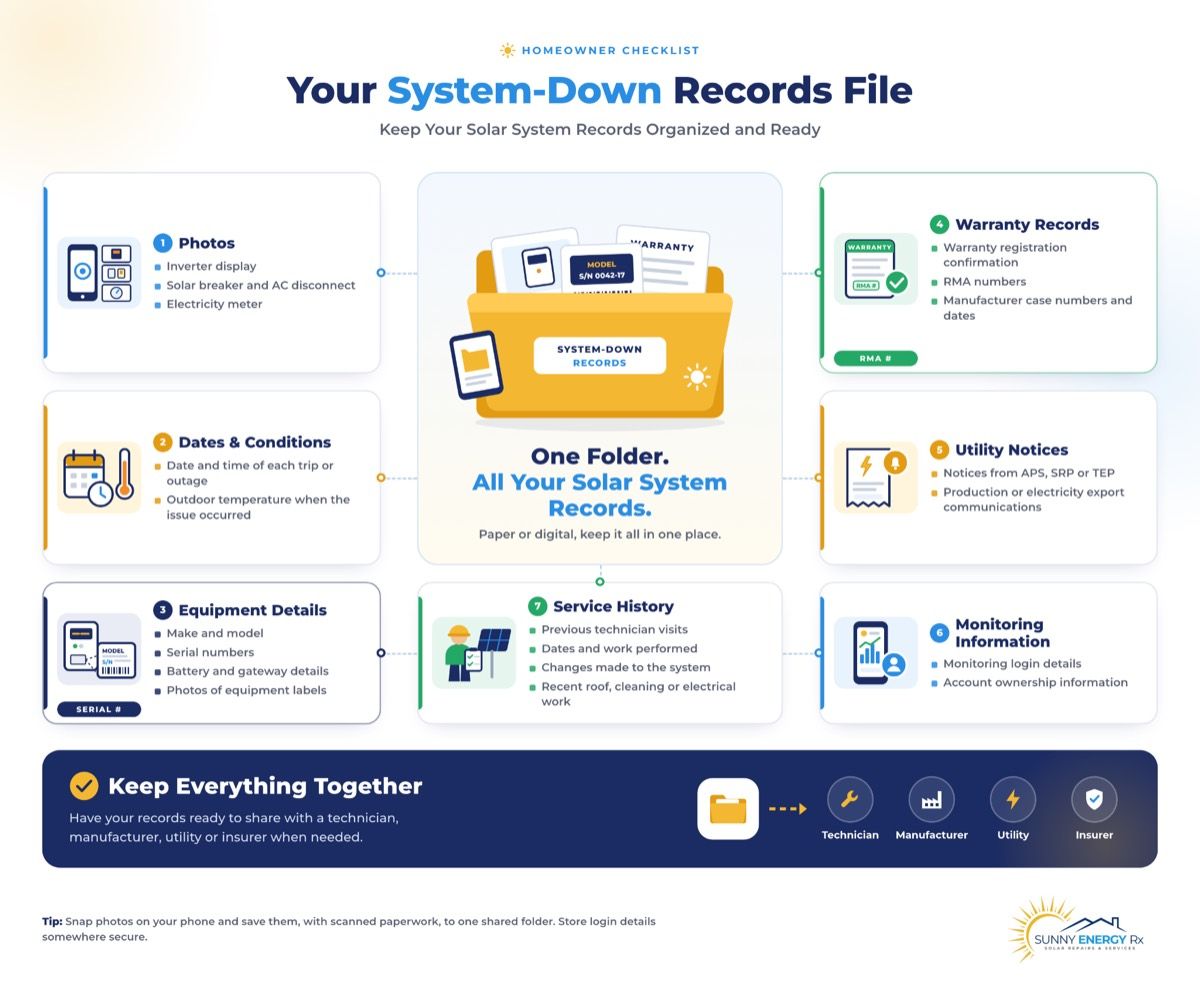
Keep these together in one folder, on paper or on your phone, so you can hand them to a technician, a manufacturer, a utility or an insurer at once. For the full version, see our orphaned-system guide.
Photos: The display, breaker, disconnect and meter.
Dates and conditions: The date, time and outdoor temperature of each trip or outage.
Equipment: Make, model and serial number of the inverter and any battery or gateway, with a photo of each label.
Warranty: Registration confirmation, RMA numbers and case numbers, with dates.
Utility notices: Anything from APS, SRP or TEP about production or exports.
Monitoring: Login details, and who owns the account.
Service history: Who worked on the system, when, and what changed, including any recent roof, cleaning or electrical work.
When it is time to call someone, choose carefully, because who does the work matters as much as the repair.
Conclusion: What to Do When Your Solar System Is Down or the Breaker Keeps Tripping
A solar system that is down or a breaker that will not stay on is stressful, but it is rarely a mystery once you know what to look for. Observe what is off and whether anything is hot, smelly or scorched. Isolate by finding the breaker, the disconnect and the meter, and leaving every enclosure closed. Record the photos, the dates and the temperature at each trip. Route the problem to the right person, and leave the breaker, the wiring and the inverter to a licensed technician.
In Arizona, heat, age and monsoon season make breaker and wiring trouble more likely, so a breaker that trips twice deserves a diagnosis, not a third reset. And if you see sizzling, burnt wires, smoke or a fire event, stop and keep the system off. Whether the answer is a worn breaker, a loose connection, a closed installer or a system that has quietly been down for weeks, the owners who document early get faster repairs and stronger claims.
Solar system down, breaker tripping, or need repairs even if we didn’t install it? Call Sunny Energy RX at 480-470-1023.
Cost depends on the cause, the age and brand of the equipment, warranty status, parts availability and how hard the equipment is to reach. Ask for a written diagnostic and quote before any work begins, and ask whether the diagnostic fee is applied to the repair.
It depends on the fault, the age of the equipment and whether parts are still available. A single worn breaker is usually worth repairing. Repeated failures in older equipment may point toward replacement. A written diagnostic helps you compare options. See our inverter guide’s repair-or-replace section.
Often, depending on the work and your city or county. Replacing a breaker may differ from replacing an inverter or repairing fire damage. Ask your local building department, or ask the technician to confirm before work begins, and get the answer in writing.
Often, yes, especially after a fire or a utility disconnect, or if equipment changes. Check your utility’s interconnection rules, or ask the technician to confirm. Ask before work starts so reconnection is not delayed.
It depends on the cause. A diagnostic visit is often quick. Waiting for parts, utility steps or manufacturer approvals usually takes longer. Ask for a realistic timeline up front, including what happens to your production in the meantime.
Have photos of the display, breaker, disconnect and meter, the date and time it went down, the temperature at each trip, any error wording, your app screenshots and any warranty or case numbers. Having these ready often avoids a second call.
It stops, and your home keeps drawing grid power. Keep your utility bills, since they document the lost production. A system can sit down for weeks before a bill shows it, so check your app monthly.
Contact your lease provider first. Don’t let anyone open or repair the equipment without their approval, because unapproved work can breach your lease. Ask who is authorized to service the system, and keep the answer in writing.
About the author
Joseph Cunningham
Published · Updated