The inverter converts the DC power from your panels into the AC power your home uses, and it does that all day, every day, in some of the harshest conditions electronics can face. Rooftops pass 130°F in summer. Many inverters hang on west-facing walls or sit in garages that never cool down. Fans clog with dust, heat forces the unit to cut its own output, and monsoon surges test every component. Many Arizona systems are now 10 to 15 years old or more, so a lot of inverters are reaching the end of their expected life.
That is why a solar inverter not working is such a common problem here, and why it helps to know what you are looking at before you pick up the phone. A blank screen, a red light and an error code can each mean something different. Some are harmless and clear on their own. Others point to a failing part or a wiring fault that needs a certified technician. Solar inverter troubleshooting takes a few minutes and no tools, and it starts with telling them apart.
This solar inverter troubleshooting guide splits the work in two. When your solar inverter is not working, your job is to read the inverter, record what it shows, route the problem to the right person and protect the system from a repeat. The technician’s job is the repair. If you do your part well, the repair is faster, cheaper and easier to claim under warranty.
Before you move on to the sections below, do these four things.
The Framework: Read, Record, Route, Protect
A solar inverter problem feels urgent, but the first few minutes matter more than the first phone call. What you notice, what you write down and what you leave alone will decide how fast the repair goes, how much it costs and whether the warranty holds. Most owners skip straight to calling. The ones who get fast, clean fixes usually do four things first: Read, Record, Route, Protect.
None of it needs tools, and none of it means going near live wiring. It takes about a few minutes and it makes the technician’s job much easier.
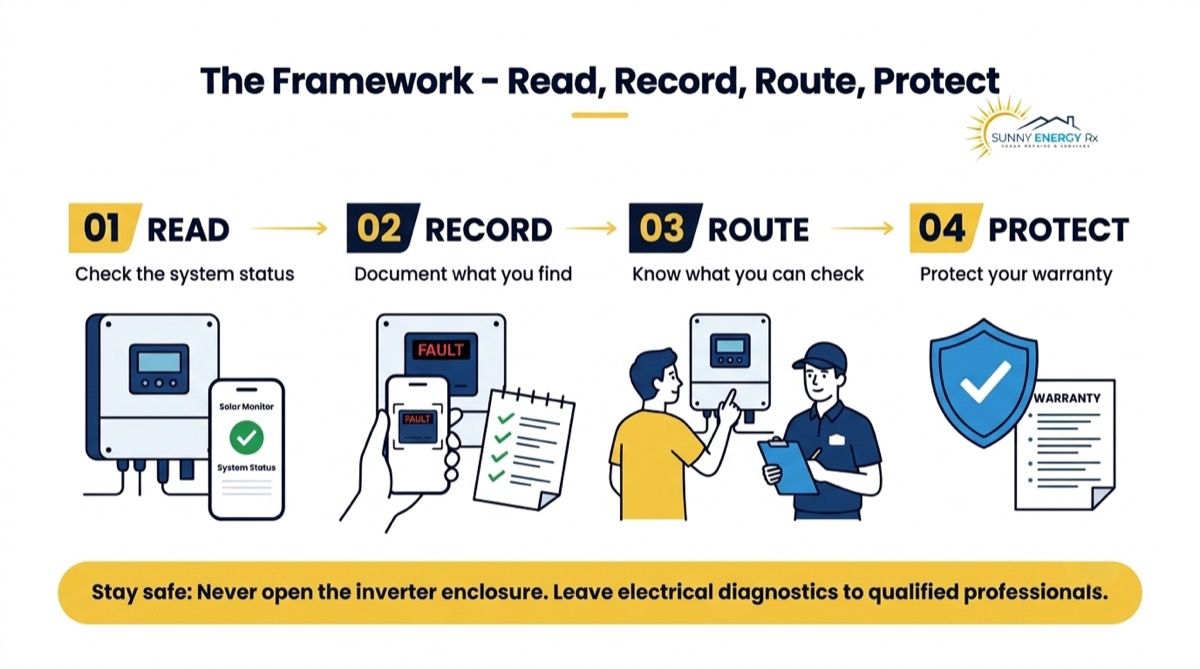
Read. See what the screen, lights and app say right now, and whether the system is producing, reporting, or both. Those are different problems.
Record. Photograph the code, the lights and the label. Write down the date it started and any recent roof, electrical or utility work. Dated records are the raw material of every warranty claim.
Route. Do the owner-safe checks, and stop there. Anything inside the enclosure, on the roof or in the DC wiring goes to a certified technician.
Protect. Set up monitoring that alerts a person, build solar inverter maintenance into your routine by checking shade and airflow around the inverter for Arizona heat, and start an inverter records file (see Your Inverter Records File).
Once you’ve read and recorded the problem, the bigger question is whether the unit is worth fixing at all.
Repair or Replace? Inverter Lifespan, Warranty and Arizona Heat
When a solar inverter starts faulting, the first question is usually “what is wrong?” The more useful one is “is it worth fixing?” The answer rarely comes down to the fault alone. It depends on the unit’s age, what the warranty covers, whether parts and replacement models are still available, and how the inverter has behaved over time. In Arizona, where heat adds extra strain, those factors weigh differently than they would in a milder climate. Here is how each one affects the decision.
Age and heat. String inverters commonly last a decade or more, with microinverters often rated longer. But a unit on a 130°F roof or a sun-baked wall works harder than that range assumes, so in Arizona expect the shorter end. If your have a case of “solar inverter not working” and the inverter is 10 to 15 years old, plan for a possible replacement.
Warranty. Terms vary by brand, model and registration, and some cover only the part while others add labor or shipping. Check your documents and confirm with the manufacturer.
Repair or swap. Solar panel inverter repair at board level, such as a relay, display or fan, is for the manufacturer or a certified technician only. Opening the unit yourself can void the warranty and puts you next to live electrical parts. Repair suits a younger unit with an isolated fault. A swap suits an older unit, discontinued parts or repeat inverter failure.
Like-for-like or upgrade. A discontinued model is rarely replaced by an identical one, and a different brand is sometimes possible. A technician must confirm compatibility with your panels, optimizers, monitoring and utility requirements first.
If the same unit fails twice, record every date, code and RMA number. A pattern strengthens a claim and can point to an upstream cause.
Cost depends on age, warranty status, model availability and whether the unit is on a wall or a roof. Prices aren’t quoted here because each system differs, so ask for a written diagnostic and quote before work starts.
Need help now? Sunny Energy RX offers Solar Inverter Replacement and Warranty Claim Assistance for systems from any installer. Call 480-470-1023.
If you already know which way you’re leaning, the map below helps you match what you’re seeing to the right section.
Situation Map: Find Your Problem Fast
Owners describe solar inverter problems in many ways: a red light, a blank screen, a code they can’t look up, a notice from the utility. Troubleshooting solar inverters starts with finding your row, then jumping to the numbered section. Rows 5 and 6 are safety situations, marked with a red flag (🚩) so you see them first.
# | What you’re seeing | What it usually means | First move this week | Go to |
1 | Solar inverter not working, offline or dropping in and out. | Anything from a tripped breaker to a failed unit | Photograph display and lights; check breaker and app | Section 1 |
2 | Red, flashing green, blue or yellow lights | A fault, standby or a communication state, depending on brand | Match the light pattern to your brand’s chart | Section 2 |
3 | An error code on the screen or in the app | A grid, hardware or safety event logged by the inverter | Record the exact code and model | Section 3 |
4 | Blank screen, won’t power on, stuck in “waiting” | No power reaching the inverter, or a failed board | Check the breaker once; do not open the unit | Section 4 |
5 🚩 | Arc fault, ground fault or isolation (RISO) fault | Damaged wiring or a connector somewhere in the array | Stop resetting; book a technician | Section 5 |
6 🚩 | Buzzing, clicking, heat, fan failure or smoke | Component wear, heat stress or a fire risk | Smoke: leave and call 911. Otherwise record and book | Section 6 |
7 | A microinverter, optimizer or Tigo TAP not reporting | A panel-level device or its signal has failed | Note which panel IDs; roof work needs a technician | Section 7 |
8 | Manufacturer sent a new inverter and nobody will install it | Warranty part approved; labor is a separate matter | Keep the RMA number; find a certified installer | Section 8 |
9 | Installer is gone and the inverter is down | Equipment warranty usually remains; the service contact is lost | Contact the manufacturer directly | Section 9 |
10 | APS or SRP says you aren’t producing | The inverter is often the first thing to check | Read the inverter, then the bill | Section 10 |
11 | Errors started after roof work or another contractor | Disturbed wiring, connectors or settings | Record the dates; book a diagnostic | Section 11 |
12 | Firmware update, cell kit or a setting needs changing | Communications hardware or configuration, not a failure | Use the official app only; settings need a technician | Section 12 |
1. SOLAR INVERTER NOT WORKING OR OFFLINE
My Solar Inverter Is Not Working. How Do I Know If It’s Broken?
Quick Answer: Read it before you decide it’s broken. A tripped breaker, a grid event, a lost connection, or a real hardware failure can all look like “not working.” Photograph the display, lights, and any code, check the solar breaker once, and compare the inverter with your app. If it keeps dropping out or stays down all day, book a technician. |
What You’re Seeing
“It fluctuates between working and startup.” “It worked for two days after a reset.” “One of my two inverters is down.” “I have to start one unit by hand every morning.”
What’s Actually Happening
A solar inverter not working is a symptom, not a diagnosis. A dark display, a blinking light, an error code or a system that has stopped producing can each mean something different. This section is a router: start with what you see on the unit, and it sends you to the matching section. Note the symptom before touching anything, and never open the enclosure.
Symptom or Indicator | Section |
Red, flashing green, blue or yellow lights | Section 2 |
A code on the screen or in the app | Section 3 |
Nothing on the screen, or “waiting” all day | Section 4 |
Arc, ground or isolation fault wording | Section 5 |
Buzzing, clicking, heat or smoke | Section 6 |
One panel “not reporting” | Section 7 |
The Arizona factor is heat. An inverter that runs fine in March and drops out on 115°F afternoons may be derating or shutting down to protect itself, which looks like a unit that “comes and goes.” Here is what you need to do right away:
The Fix
Read the inverter. Photograph the display, every light and the label. Note whether each light is solid or flashing.
Compare with your app. Does it show zero, an alert or no connection? Screenshot it with the date.
Check the solar breaker from a safe position. This is how to reset an inverter fault safely: if it’s tripped and your manual allows it, reset it once. If it trips again, leave it off.
Write down the pattern. Time of day, outside temperature, whether it recovers on its own or only after a reset.
Book a diagnostic if it stays down through the next sunny midday or keeps dropping out. Share your photos and notes when you call.
Field Note: An owner reset the system, watched it run normally, and saw it fail again days later. The pattern, a reset that “works” and then doesn’t, is worth reporting, because a fault that returns after a reset is not a one-time glitch.
A bad inverter usually shows a persistent fault code, stays dark in daylight, or keeps dropping out. Photograph the display and any codes, with the date and time, before touching anything. Then have a certified technician test the unit, because several different faults can look alike from the outside.
Start with the display, the indicator lights and the solar breaker, reading each from a safe position. Then compare what you see with your monitoring app, which may show when production stopped. Do not open the unit, and call a technician if the fault persists.
Repeated restarts can reflect grid instability, heat protection or a failing component. Record when they happen, including the time of day and the outdoor temperature, since heat-related patterns matter in Arizona. A technician can read the inverter’s logs and identify the actual cause.
Yes. On systems with two inverters, one can fault while the other keeps producing, which is why output can drop by about half. Check your app for each unit’s production, and report which inverter is affected, since the working one may hide the problem.
A reset clears the symptom, not the cause. If the fault returns, stop resetting the unit, because repeated cycling can hide a developing problem and stress the equipment. Note each occurrence and book a diagnostic so a technician can find the underlying cause.
How Sunny Energy RX handles this: Our Solar System Diagnostics visit sorts “not working” into a named cause, backed by 17+ years of Arizona solar experience, and tells you what failed before any repair starts.
If the lights are what caught your eye, the next section explains what each color is trying to tell you.
2. STATUS LIGHTS: RED, FLASHING GREEN, BLUE, YELLOW
What Do the Red, Flashing Green and Blue Lights on My Solar Inverter Mean?
Quick Answer: The same color means different things on different brands. However, broadly, red usually signals a fault. Flashing green often means the inverter is waiting or standing by. Blue is usually a communication light. Photograph the pattern, note the date, and book a technician if a fault light stays on. |
What You’re Seeing
“Flashing green with a solid blue.” “There used to be an amber light, and now there isn’t.” “My inverter light is off. Is it dead?” “One inverter shows blue and green, the other only green.”
What’s Actually Happening
Inverter lights are a quick way to see what the unit is doing, and most brands use similar colors for similar states.However, light colors, flash patterns and meanings may differ by brand, model and firmware. Hence treat this as a general guide and confirm the exact meaning in your manufacturer’s manual or app.
Solid green: The unit is producing.
Flashing green: Connected but waiting, often for daylight or stable grid conditions.
Red: A fault or error. Don’t reset the unit repeatedly.
Amber or orange: A warning or a state that needs attention.
Blue: Usually a communication or Bluetooth status, not a fault.
Light off in daylight: Check the solar breaker and your app.
Many owners also find the light only after the utility calls. On systems with two inverters, a difference between the units is itself a clue: one may have lost its connection, or one may have stopped producing.
Now that you know broadly what the colours mean, here is what you need to do next.
The Fix
Photograph the lights. Take one wide shot of all the lights together, then a close-up of each, and note whether each is solid or flashing.
Record the details. Write down the date and time, and whether it is daytime and sunny, since a dark or waiting unit at night is normal.
Compare with the app. Check your monitoring app for alerts or a production drop, and screenshot anything it shows.
Look up your pattern. Find the meaning in your model’s manual or the manufacturer’s support page, and use it for reference only, not for repairs.
Book a technician if the fault persists. If a fault light is still on after the next sunny midday, call a certified technician and share your photos, notes and screenshots.
Field Note: Two homeowners in Mesa flagged by SRP found the status light only after the utility called. The light had been showing a fault for some time. A weekly look at the inverter from the ground, as part of basic solar inverter maintenance, would have caught it sooner.
Usually standby, meaning the unit is connected to the grid but not producing yet. At dawn and dusk this is normal, because there isn’t enough sunlight. If it flashes all day, even in full sun, photograph it, note the times and book a technician.
Not usually, but it is a fault state and should be taken seriously. Photograph the light and any code, don’t reset it repeatedly, and book a technician. If you smell smoke or burning, or see scorching, leave the area and call 911.
On most brands, a steady green light signals normal production, and the display or app shows power output. Normal patterns differ by brand and model, so confirm yours in the manual. Photograph the lights while all is well, so you have a reference later.
Often a warning or a state that needs attention, though meaning depends on the brand, and some brands show it as orange or amber. Photograph the light and any display message, then check your manual or app. If it persists, book a technician.
Not necessarily. At night, all lights are normally off. In daylight, check the solar breaker once and your app, without opening the unit. If the unit stays dark all day while the sun is out, book a technician.
How Sunny Energy RX handles this: Our Performance Troubleshooting reads light patterns on all major brands, so you know whether the unit is faulting, waiting or just reporting badly. See also section 10 if a utility notice started this.
Lights show the state of a solar inverter not working, but an error code tells you what the inverter actually logged.
3. ERROR CODE ON THE DISPLAY OR APP
My Inverter Shows an Error Code. What Does It Mean and Is It Urgent?
Quick Answer: Record the exact code and your model, then look it up in the manufacturer’s manual. Grid codes often clear on their own. Arc, ground and isolation codes are safety faults and need a technician. Don’t clear a code repeatedly; a code that returns is information, and the manufacturer may ask for it. |
What You’re Seeing
“The display says Disturbance Fac-Bfr.” “Fronius shows 480.” “My Solis says NO GRID.” “Tesla shows E050.” “The app says 4301.”
What’s Actually Happening
Solar inverter fault codes fall into three groups: grid events, hardware events and safety events. We have discussed what they mean:
Grid events: The utility voltage or frequency left the allowed range, and the inverter paused until it recovered. Record the code and the time. If it repeats, call a technician.
Hardware events: These point to a failing component, such as a fan, relay or board. Record the code and book a technician.
Safety events: Arc, ground and isolation faults relate to the wiring. Stop and see Section 5.
Once you know which group your code falls into, the steps below tell you what to do next.
The Fix
Photograph the code and the model label. Take a clear shot of the display or app message showing the code, and a second of the label that lists the model and serial number.
Record the details. Write down the date and time, and whether production stopped completely or only declined, since that helps a technician tell the fault types apart.
Look up the code. Find its meaning in the manufacturer’s manual or support page, and use it for reference only, not for repairs.
Don’t reset the inverter fault repeatedly. Repeated resets hide the cause and can stress the unit, so give a grid code time to clear on its own.
Book a technician if needed. Call if the code persists, repeats or is a safety code, and send the photo, code, model and timeline.
Note: Codes and wording vary by brand, model and firmware, so confirm the exact meaning in your manufacturer’s code list.
Use the code list in your manual or the manufacturer's support site, matched to your exact model, since the same code can mean different things on different units. Photograph the code first, along with the model label, so you can search accurately and share it later.
Only if your manual explicitly allows an owner reset. If the code returns, or the wording mentions arc, ground or isolation, stop and call a technician. Repeated clearing can hide the cause and stress the unit, so note each occurrence instead.
Not automatically. Follow the shutdown steps in your manual, and don't open the enclosure. If you notice smoke, a burning smell or scorching, keep away from the unit and call 911. Otherwise, photograph the code and book a technician.
Not always. Many codes are grid events that clear on their own once utility voltage or frequency returns to normal. Repeat or hardware codes need a technician's read, and replacement is only considered once a diagnostic shows the unit can't be repaired economically.
It may be, if a defective part caused it. The warranty holder makes that decision, and terms vary by brand, model and registration. Keep a record of codes, photos, dates and any RMA numbers, since a documented pattern strengthens a claim.
How Sunny Energy RX handles this: Our NABCEP-certified technicians read and log codes on SolarEdge, SMA, Fronius, Solis, Enphase and other brands, then build the claim file the manufacturer asks for. For warranty steps, see our orphaned-system guide.
Solar inverter not working never get far enough to show a code, which brings us to blank screens and “waiting” mode.
4. BLANK SCREEN, WILL NOT POWER ON, STUCK IN “WAITING”
Why Is My Solar Inverter Screen Blank or Stuck in “Waiting”?
Quick Answer: “Waiting” or standby at dawn and dusk is normal. Waiting all day, or a blank screen in daylight, is not. Check the solar breaker once, photograph what you see, and look at whether the app still reports. Don’t open the unit. If it stays dark or stuck past the next sunny midday, book a technician. |
What You’re Seeing
“The screen is completely blank.” “It says waiting all day.” “Both of my inverters are dead.” “The display is too faded to read.”
What’s Actually Happening
A blank screen means one of two things: power isn’t reaching the unit, or a board inside it has failed. A unit stuck on “waiting” is missing something it needs to start, such as grid voltage, enough DC input from the panels or a completed self-check. If two inverters go dead at once, the cause is probably upstream of both, in a breaker, a disconnect or the utility connection. And before you assume a dark unit is dead, check your app, because a faded LCD can hide an inverter that is still working.
Start with these simple solar inverter troubleshooting checks, which rule out the common causes before you call anyone.
The Fix
Confirm it is daytime with decent sun. A dark or waiting unit at dawn, dusk, night or under heavy cloud is often normal, so check the conditions before you worry.
Check the app. If it still reports production, the inverter may be working and only the display has faded or failed.
Check the breakers. Look at the solar breaker and the visible AC disconnect from a safe position, and reset a tripped breaker once, only if your manual allows.
Don’t open the unit. Photograph the display, the lights and the breaker positions, and leave the inside to a certified technician.
Book a technician if it persists. If the unit stays blank or in “waiting” through the next sunny midday, call and send your photos, the time and what the app showed.
The inverter is waiting for grid voltage, enough sunlight or a completed self-check before it starts producing. At dawn and dusk this is normal. If it stays in waiting all day, even in full sun, photograph the screen, note the times and book a technician.
Yes, in many systems. Look at the solar breaker once from a safe position, and reset it once only if your manual allows. If it trips again, stop, leave it off and call a technician, because a repeat trip points to a real fault.
Follow only the owner steps in your manual, such as a single breaker reset. Never open the enclosure or touch the DC side, which can stay live in daylight. If the fault returns after a reset, stop and book a diagnostic.
On a string inverter, yes, because the whole array feeds through that one unit. On microinverters, one failed unit usually affects only its own panel. Check your app to see which units are reporting, and tell the technician what it shows.
How Sunny Energy RX handles this: our NABCEP-certified technicians handle Solar Inverter Replacement where coverage applies, and our guide to signs your system needs repair covers wider faults.
If your inverter is reporting a wiring-related fault, the stakes change, so read the next section before touching anything.
5. ARC FAULT, GROUND FAULT OR ISOLATION (RISO) FAULT
My Inverter Shows an Arc Fault or Ground Fault. Is It Safe?
Quick Answer: Treat it as a safety fault. An arc, ground or isolation fault means the inverter found a problem in the wiring between the panels and the inverter, and it stopped to protect the system. Read and report only. Don’t reset it repeatedly, don’t open anything, and book a technician. |
STOP AND CALL. Do not touch the inverter, DC disconnect, conduit or panels. Do not reset the system more than once, and only where your manual allows. Smoke, a burning smell, melted plastic or visible arcing: leave the area and call 911. Then call a certified technician.
What You’re Seeing
“I reset the system and it still exists.” “It’s not merely an error reset.” “Low RISO on my SolarEdge.” “The garage GFCI outlets tripped while we were away.”
What’s Actually Happening
These codes mean current is going where it should not, or the insulation between the array and ground has dropped below a safe level. The fault sits somewhere in the array wiring, which is live in daylight. Arizona has several common causes:
Heat-cycled connectors that loosen over years of daily heating and cooling.
UV-cracked insulation on wiring exposed to sun.
Birds and rodents chewing wire under panels.
Monsoon moisture, which can trigger isolation faults on damp mornings.
Disturbed wiring after roof work or another contractor’s visit.
A fault that returns after a reset is the reason for a technician’s visit, not another reset. You can’t safely find or fix this yourself, so the steps below focus on staying safe and giving a technician what they need.
The Fix
Stay clear of the inverter and DC components. Keep people and pets back, and don’t touch the unit, the conduit or the wiring, since DC parts can stay live whenever the panels are in daylight.
Photograph from a safe distance. Capture the display, any code and the lights, plus a second shot of the model label, without moving close to the unit.
Record the details. Write down the date, the weather and any recent roof work, electrical work or critter activity, since these can point a technician to the cause.
Don’t reset the inverter fault repeatedly. Do one reset at most, and only where your manual allows, because repeated cycling can hide the cause and stress the equipment.
Book a certified technician. Send your photos and notes, and mention whether the unit has shown the same fault before.
It can be. Current may be flowing where it shouldn’t, and the array wiring is live whenever there is daylight. Stay away from the inverter, conduit and wiring, keep people and pets back, and call a certified technician.
Loose or damaged connections, worn insulation and pest damage are the usual causes, often made worse by Arizona heat cycling. Because the fault sits in live wiring, only a technician can safely find the source. Don’t go looking for it yourself.
It means the insulation resistance between the array and ground has dropped below a safe level. Moisture, damaged wire or a failed connector can cause it, and damp monsoon mornings can trigger it. A technician needs to test the array.
Only once, and only if your manual explicitly allows an owner reset. If the fault returns, stop and book a technician. Repeated resets hide the cause and can stress the equipment. If you smell burning or see scorching, leave the area and call 911.
The cause is still there. A reset clears the message, not the damaged wire, loose connector or chewed insulation behind it. A returning fault is the signal to stop resetting and book a diagnostic, with your codes, dates and photos ready.
How Sunny Energy RX handles this: Our NABCEP-certified technicians trace arc and ground faults through the array and fix the cause. See our bird-proofing blog for pest damage and our roof removal and reinstallation guide for post-roof faults.
Not every fault shows up on a screen; sometimes you hear, feel or smell it first.
6. NOISE, SMOKE, OVERHEATING OR FAN FAILURE
Solar Inverter Problems: My Inverter Is Buzzing, Clicking or Overheating. Should I Worry?
Quick Answer: Smoke or a burning smell is an emergency: leave and call 911. A soft hum under load is normal. A new loud, continuous noise, constant clicking with no output, or a hot unit is not. Record the sound, the time and the temperature, don’t touch the equipment, and book a technician. |
STOP AND CALL. Smoke, a burning smell, melted plastic or sparking: leave the area and call 911. Do not touch the inverter, do not spray water on it and do not try to switch it off if that means standing next to it.
What You’re Seeing
“A new loud continuous noise.” “Constant clicking, no output.” “A high-pitched sound at sunset.” “The fan sounds like it is dying.” One owner reported a burning smell.
What’s Actually Happening
Sound or Sign | Often Normal | Not Normal |
Hum | A soft hum while producing power | A new, louder continuous noise |
Clicking | A few relay clicks at startup | Constant clicking with no output |
High-pitched | A faint tone at sunset on some units | A loud, new or growing whine |
Fan | Spins up on hot afternoons | Grinding, rattling or no fan at all |
Heat | Warm to the touch on hot days | A burning smell, discoloration, or smoke |
Arizona heat is hard on inverters, and it shows up in a few ways. In summer, many units cut their output to protect themselves, so you can lose production long before anything actually breaks. Older units can lose their cooling fans, and once that happens the inside of the unit just keeps getting hotter. If your inverter sits on a west-facing wall in direct afternoon sun, it’s running hotter than the manufacturer ever planned for. Airflow matters too. Manufacturers specify how much clearance a unit needs, so stored items, plants or a tight installation can trap heat without anyone noticing.
If something on the “not normal” side sounds familiar, here is how to start troubleshooting your solar inverter safely.
The Fix
Safety first. If you smell smoke or burning, or see scorching, leave the area and call 911 before doing anything else.
Record the sound. Take a short phone clip from a safe distance, since a buzz, hum, click or rattle can help a technician narrow down the cause.
Note the pattern. Write down the time of day, the outdoor temperature and whether output drops when the noise starts, because heat-related patterns matter in Arizona.
Look from the ground. Check for blocked vents, direct afternoon sun and debris around the unit, but don't clean it or move anything near it yourself.
Book a technician. Call for any noise that is new, loud, getting hotter or constant, and send your clip and notes.
A soft hum while the unit is producing power is common, because the electronics and transformer vibrate slightly under load. A new, louder or constant noise is not normal. Record a short clip from a safe distance and book a technician.
Some units give off a faint tone as power falls at the end of the day, when the electronics switch under a light load. If the sound is new, loud or growing, record it and ask a technician to check the unit.
Yes. Heat can force derating or shutdowns, especially when the unit sits in direct afternoon sun or its vents are blocked. Note the time and temperature when it happens. If shutdowns repeat, book a technician to check the unit and its airflow.
Don't go near it. Leave the area immediately and call 911, and keep others away too. Do not touch the unit, the breaker or the wiring, since heat damage can leave live parts exposed. Call a certified technician only after the emergency is cleared.
Follow your manufacturer's clearance and airflow rules first. A cover can block ventilation and trap heat, which defeats the purpose. Ask a technician before adding one, and ask about a proper shade or relocation option designed to keep airflow clear.
How Sunny Energy RX handles this: Our Solar Inverter Replacement service replaces units damaged by heat, with 17+ years of experience in Arizona heat. For a system that has gone down, see our system-down and maintenance guides.
If the main inverter looks and sounds fine but one panel has gone quiet, the problem may sit at panel level.
7. MICROINVERTER, OPTIMIZER OR TIGO TAP NOT REPORTING
Why Is One Microinverter or Optimizer Not Reporting?
Quick Answer: “Not reporting” can mean the panel stopped producing, or only that its signal stopped reaching the app. These devices sit under the panels, so every fix beyond reading the app is roof work for a technician. Note the panel IDs, screenshot the app, and book a diagnostic. |
What You’re Seeing
“Enphase says one microinverter is not reporting.” “Power optimizers are not paired.” “SolarEdge couldn’t reconnect one panel remotely.” “The Tigo TAP signal is weak.”
What’s Actually Happening
A panel-level device converts or conditions power at each panel and reports back through a gateway, the inverter or a communications unit. Three situations come up most:
“Not reporting”: the device has stopped sending data. It may still be producing, or it may have failed.
“Power optimizers are not paired”: the inverter cannot see one or more optimizers, so production can stop on that string.
A weak Tigo TAP signal: the communications link, not the panels, is the problem.
Panel-level solar inverter problems are common because these devices sit in rooftop heat all day, and age and heat cycling wear them down. Check the app’s layout for patterns: one panel, a row or a whole string. Once you know which pattern you are seeing, these steps help you document it without going on the roof.
The Fix
Screenshot the problem panels. Open the panel-level view in your app and capture every panel marked zero or missing, plus the overall system view for context.
Note the details. Write down the panel IDs and the date the alert began, since a start date can help a technician tie it to an event such as a storm, outage or roof work.
Compare with your bill. "Not reporting" is sometimes a signal problem, not a production problem, so check your utility bill or meter to see whether power is still being generated. For monitoring fixes, see our monitoring guide.
Stay off the roof. Re-pairing, replacing a device or checking connectors is technician work, and the roof and wiring can be hazardous, especially in summer heat.
Book a diagnostic. Share your screenshots and notes, and ask whether the fault can be reached remotely first, which may save a roof visit.
The microinverter has stopped sending data to the gateway. It may be a signal issue, with the panel still producing, or a failed unit. Check the app for patterns, screenshot the affected panels, and let a technician tell which it is.
The inverter cannot see one or more optimizers, so production on that string can drop or stop. Photograph the message and note the date it began. Don't go on the roof to check connectors, and book a technician.
It depends on the system design and the fault. Some setups isolate the affected panel, while others lose more output from the string. Check your app for the pattern, then ask a technician to test it and confirm what is happening.
Possibly. Coverage depends on the brand, the age of the device and your warranty terms, and the warranty holder makes the final decision. Keep your screenshots, dates and any RMA numbers, and confirm your terms with the manufacturer.
Sometimes, for signal or pairing issues, a technician can reach the system through the monitoring platform. A failed device on the roof needs someone on site. Ask whether a remote check is possible first, since it may save a visit.
How Sunny Energy RX handles this: Our Solar Panel Monitoring & Maintenance service works on all major brands, from Enphase to SolarEdge and Tigo, and can restore reporting and replace failed devices. See also our monitoring guide and production guide.
Once a failed unit has been diagnosed and the manufacturer approves a replacement, the next question is who installs it.
8. INVERTER FAILED: WARRANTY REPLACEMENT NEEDS INSTALLING
The Manufacturer Sent a New Inverter. Who Installs It?
Quick Answer: A certified, licensed technician installs it. The manufacturer usually ships the part, and labor is a separate question. Keep the box sealed and the RMA number safe, photograph the failed unit’s label, ask the manufacturer whether it reimburses labor, then book a certified technician. |
What You’re Seeing
“I need an installer who doesn’t charge a fortune.” “I don’t want to electrocute myself.” “This is the third replacement.” “I’ve been billed over $500 and the claim is stuck.”
What's Actually Happening
An approved warranty usually means a replacement part. It rarely means someone shows up to install it. If your original installer is gone, you may be holding a sealed box with nobody to wire it. Labor can be covered, partly covered or not covered at all, depending on the manufacturer’s terms, so confirm yours before you book anyone.
Repeat failures add pressure, because a unit that has failed more than once makes your records of codes, dates and RMA numbers more important. And in Arizona heat, a replaced unit works under the same conditions that wore out the first, which is why the steps below include getting the installation, mounting and airflow checked, not just swapping the part. Getting the part approved is only the first step, so work through these in order to get it installed, checked and returned.
The Fix
Keep the RMA number and leave the box sealed. Write down the RMA number and let the technician unpack the replacement at install, so any damage or wrong model is caught on site.
Photograph the failed unit's label. Capture the model and serial number, since the manufacturer will usually ask for them to process the claim.
Ask about labor in writing. Some warranties cover only the part, so ask whether labor is reimbursed and get the answer in writing before work starts.
Book a qualified technician. Choose a certified technician who has installed replacements on systems they didn't build, and ask for a written quote first.
Verify before they leave. Have the technician commission the unit, reconnect monitoring and confirm production in the app while they are still on site.
Return the failed unit under the RMA. Follow the manufacturer's shipping instructions, keep your tracking number and check the return deadline to avoid a charge for the replacement.
Often a licensed electrical or solar contractor can. Ask whether the manufacturer requires brand certification for warranty work, and confirm in writing that the warranty stays valid if someone other than your original installer does the job.
Sometimes, but not always. Some warranties cover only the part, while others add labor or shipping, and terms vary by brand, model and registration. Ask the manufacturer in writing before work begins, so the technician’s invoice holds no surprises.
Contact the manufacturer directly with the serial number, fault codes, photos of the display and label, and proof of ownership. A service company can help build the file and submit it. Keep a record of who you spoke to and when.
Often a few hours on site once the part and a technician are both available. Waiting for parts, approvals or a booking slot usually takes longer. Ask for a realistic timeline up front, including what happens to your production in the meantime.
Record each failure, fault code, date and RMA number, along with who you spoke to. A documented pattern of repeat failures strengthens a claim and may point to an upstream cause, such as heat, airflow or wiring. Ask a technician to check that cause.
How Sunny Energy RX handles this: Our Solar Inverter Replacement and Warranty Claim Assistance service, delivered by NABCEP-certified technicians, handles the claim file, the install and the production check. See our orphaned-system guide.
Getting a replacement installed gets harder still when the company that installed your system is no longer around.
9. INSTALLER GONE AND THE INVERTER IS DOWN
My Installer Is Out of Business and My Inverter Failed. Who Fixes It?
Quick Answer: For solar inverter problems after your installer closes, start with the inverter manufacturer, not the installer. The equipment warranty usually survives an installer closing, even though your service contact is lost. Contact the manufacturer with your serial number and proof of ownership, then find a certified service company that works on your brand. |
What You’re Seeing
“The number on my paperwork is disconnected.” “The manufacturer keeps telling me to call my installer.” “My system has been down for weeks and nobody will help.” “I don’t even know who is allowed to touch it.”
What’s Actually Happening
The equipment warranty belongs to the product, and it usually outlasts the company that installed it. What disappears is the person who used to handle the claim, the service calls and the paperwork. We don’t make status claims about any named company. What matters is the next step.
The usual snag is the manufacturer’s first reply: “contact your installer.” Manufacturers vary in how they deal with owners. Many will talk to you directly, and some require an authorized installer or service provider to file the claim. Any workmanship warranty or extended coverage that the installer itself provided may be lost, so check your documents to see which coverage came from whom.
Once you know the equipment warranty is your starting point, these steps take you from a dead number to a working claim.
The Fix
Gather your proof. Find the serial number, model label photo, purchase or contract paperwork and any registration confirmation, since the manufacturer will ask who owns the unit.
Photograph the fault. Capture the display, lights and any code, and screenshot the app, with the date and time.
Contact the manufacturer directly. Give your serial number, fault details and proof of ownership, and ask for a claim number or RMA.
Use the right script. If they say “contact your installer,” reply: “My installer is no longer in business. Please direct me to an authorized service provider, or process the claim with me directly.”
Get the answer in writing. Ask for the claim route, labor coverage and any brand-certification requirement by email, and keep a record of who you spoke to and when.
Book a certified service company. Choose one that works on your brand and has serviced systems it didn’t install, and ask for a written diagnostic and quote first.
Don’t open the unit yourself. The inside of an inverter is for the manufacturer or a certified technician, and DC parts can stay live in daylight.
For the full steps, see our orphaned-system guide, sections 1 to 4.
A certified service company that works on your brand, or the manufacturer’s authorized network. They don’t need to have installed it. Ask whether the manufacturer requires brand certification for warranty work, and confirm in writing that the warranty stays valid.
Manufacturers vary in how they handle owners. Many will talk to you, and some require an authorized installer for the claim. Call with your serial number, fault details and proof of ownership, and ask which route applies to you.
Explain that the installer is closed and ask for an authorized service provider or a direct claim route. A clear line is: “My installer is no longer in business.” Note the date, the person’s name and whatever they promise.
Usually the manufacturer’s equipment warranty does, because it belongs to the product. Terms vary by brand, model and registration, and coverage the installer provided itself may be gone. Confirm your terms with the manufacturer in writing.
Typically the serial number and model, plus a contract, invoice, permit, utility interconnection record or registration confirmation showing the system is yours. Photograph the label and gather whatever paperwork you have before calling.
How Sunny Energy RX handles this: Our Warranty Claim Assistance service works on systems we didn’t install, including those left behind by closed installers.

Sometimes the first sign of trouble doesn’t come from the inverter at all, but from your utility.
10. APS OR SRP SAYS YOU ARE NOT PRODUCING
APS or SRP Says My Solar Isn't Producing. Is It My Inverter?
Quick Answer: Check first whether your solar inverter is not working. A utility notice of low or zero exports often traces back to a stopped inverter, a tripped breaker or a lost connection. Read the display and lights, check your app, then compare with your bill. A meter-read failure is a different problem and belongs to the utility. |
What You're Seeing
"APS failed to read meter." "SRP says my exports dropped." "My bill shows almost no solar credit." "I got a notice, but my panels look fine."
What's Actually Happening
A utility notice tells you what the meter saw, not why. Low or zero exports can come from a stopped inverter, a tripped breaker, a monitoring gap or a change in how much power your home uses. A message like "failed to read meter" can point to a meter or communication problem on the utility's side, not a fault in your solar system.
That is why the inverter comes first. If it looks normal and your app shows production, the utility is the next call. If it shows a fault or zero output, the problem is yours to chase. We don't cover rates or net-metering policy here, so send those questions to APS or SRP.
Work through these solar inverter troubleshooting steps in order to find out which side the problem is on.
The Fix
Photograph the inverter. Capture the display, the lights and any code, with the date and time.
Check the app. Look for zero or reduced production, and screenshot what it shows.
Check the solar breaker. Look at it once from a safe position, and don't open the unit.
Look at your bill. Find the solar section showing energy sent to the grid, and compare it with the same month last year. For bill steps, see our production guide.
Decide where to go next. If the inverter looks normal and the app shows production, call the utility. If the inverter shows a fault or zero, go to Sections 1 to 5.
SRP may be seeing lower exports. The cause could be a solar inverter not working, a tripped breaker, a monitoring gap or a meter issue. Check the inverter and your app first, then compare with your bill before calling anyone.
Look for the solar section showing energy sent to the grid, and compare it with the same month last year. A sharp drop that weather doesn't explain is worth checking against your app and inverter display.
Sometimes, and usually after the fact, so don't rely on it. A stopped inverter can run for weeks before a bill shows it. Monitoring that alerts a person is faster, and a monthly look at your app is simple solar inverter maintenance.
How Sunny Energy RX handles this: Our Performance Troubleshooting, backed by 17+ years with APS and SRP systems, finds whether the inverter, the meter or usage changed.
If the errors began right after someone else worked on your roof or system, the cause may be closer to home.
11. ERRORS AFTER ROOF WORK OR ANOTHER CONTRACTOR
My Inverter Started Showing Errors After Roof Work. Could That Be the Cause?
Quick Answer: It may be, or it may be coincidence. Removing and reinstalling panels touches connectors, grounding, optimizer pairing and monitoring. We make no assumption about fault. Record the dates, photograph the inverter and get a written diagnostic from an independent technician. |
What You're Seeing
"It worked until the roofer finished." "Now I have an error code I've never seen." "The roofer says it's not their problem." "Two panels aren't reporting since the reinstall."
What's Actually Happening
Taking panels off and putting them back means unplugging and reconnecting wiring that was never meant to be handled often. Connectors that aren't fully seated, disturbed grounding, optimizer pairing and monitoring connections can all cause errors afterward. Timing alone doesn't prove the cause, though, because an older fault can show up at the same moment.
Who is responsible depends on the contracts involved, and that is not something a guide can settle. What you can control is the evidence: the date of the work, the date of the first error and a written diagnostic from someone independent.
Start by documenting what you have, then get the system checked.
The Fix
Record the dates. Write down when the roof work started and ended, and when the first error or drop in production appeared.
Photograph the inverter. Capture the display, lights and any code, and screenshot the app, including the panel-level view.
Collect the paperwork. Keep the roofing contract, any reinstall invoice and the name of whoever handled the panels.
Stay off the roof. Connectors, grounding and wiring are technician work, and the roof is hazardous, especially in summer heat.
Get a written diagnostic. Ask an independent technician to check connectors, grounding, optimizer pairing, inverter status and monitoring, and to confirm production.
Share the findings. Send the written report and photos to the roofer or your insurer, and let the contracts decide responsibility.
It can, if wiring, connectors or settings were disturbed during the work. A technician has to inspect the system before anyone assigns blame, and a written diagnostic gives you something firm to show the roofer.
Connectors, grounding, optimizer pairing, inverter status and monitoring, followed by a production check. Ask for the results in writing, with photos, so you have a record of the system's condition after the work.
Yes. A written baseline before the work, with photos and production figures, helps show what changed afterward. It also gives the roofer a clear starting point, which can prevent disputes later.
How Sunny Energy RX handles this: Our Solar System Diagnostics visits produce documented findings and photos you can share with a roofer or an insurer.
Not every inverter problem is a failure; some are communication or settings issues that need a different kind of fix.
12. FIRMWARE, CELL KIT OR INVERTER SETTINGS
Does My Inverter Need a Firmware Update or a New Cell Kit?
Quick Answer: Firmware changes go through the manufacturer's official app only. Updates that need an SD card or USB stick are technician work. A cellular modem can often be swapped for Wi-Fi. Grid settings, export limits and demand management are technician-only, because they must match your utility interconnection. |
What You're Seeing
"My app says an update is available." "My monitoring went offline when the cell service ended." "Someone told me to change a setting myself." "The inverter keeps disconnecting from the app."
What's Actually Happening
Some solar inverter issues are safe for owners to handle, and others are not. Anything the manufacturer's official app offers is generally fine. Anything that needs a card, a cable or a change to how the unit talks to the grid is not.
Grid profiles, export limits and demand settings are set to match your utility's interconnection requirements. Changing them can create a compliance problem and put your warranty at risk, even when the change seems small.
The steps below separate what you can do from what to hand off.
The Fix
Use only the official app. Follow the steps it offers for updates, and don't use third-party tools or instructions from forums.
Leave card and USB updates alone. SD-card or USB firmware is technician work.
Check your connection type. If the unit uses a cellular modem that has dropped offline, ask the manufacturer or a service company whether it can move to Wi-Fi. For the steps, see our monitoring guide.
Don't change grid settings. Grid profiles, export limits and anything touching the utility interconnection belong to a qualified technician.
Book a technician for the rest. Send your model, serial number, app screenshots and a note of what you want changed.
Through the manufacturer's app, if it offers an update, and only by following the steps it shows. Anything needing a card or cable is technician work. If the app shows no update, don't look for one elsewhere.
Often, yes, depending on the brand and model. Ask the manufacturer or a service company whether your unit supports it, and whether the change affects your warranty or monitoring account before anything is switched.
A qualified technician, with settings matched to your utility's interconnection requirements. Changing them yourself can cause a compliance problem and a warranty dispute, so don't try, even if instructions are online.
Many older monitoring kits used cellular networks, and when a carrier retires its network, the modem can no longer connect. The inverter usually keeps producing, but the app goes blank. Ask the manufacturer or a service company about a Wi-Fi or replacement option.
How Sunny Energy RX handles this: Our Solar Panel Monitoring & Maintenance service includes Monitoring Assurance, which keeps your connection live and flags problems.
Whatever the fault turns out to be, what you do next can protect your warranty coverage or put it at risk.
Inverter Warranty: What It Covers and How to Keep It
Will My Inverter Warranty Cover This, and What Could Void It?
Quick Answer: If your solar inverter is not working, the warranty usually covers a defective part, and it covers labor or shipping only if your terms say so. The manufacturer decides every claim. Register the unit, keep dated records of every fault, use certified technicians and never open the enclosure. Those habits do the most to protect your coverage. |
What It Usually Covers
Most inverters have two layers of coverage, and they come from different places. The manufacturer’s equipment warranty covers defects in the inverter itself. It belongs to the product, so it usually stays in place if your installer closes, and while some terms include labor or shipping, many cover the part only. The installer’s workmanship warranty covers how the system was installed. It comes from the installer, so it may end if the installer goes out of business. Check your documents to see which coverage came from whom, because terms vary by brand, model and registration.
What Can Put It at Risk
Several things can put your coverage in danger: opening the enclosure or attempting board-level repairs yourself, work by someone without the certification your manufacturer requires, changing grid settings or loading firmware from outside the official app, and a missing registration or a missed claim deadline. Installation outside the manufacturer’s instructions is another risk, since many warranties exclude damage from improper installation, and clearance and ventilation specs are part of those instructions. On a west-facing wall in Arizona sun, that detail matters.
How to Protect It
A few solar inverter maintenance habits, started early, do the most to keep your coverage intact.
Confirm registration. Ask the manufacturer whether the unit is registered, and in your name if you bought the home with solar.
Report faults promptly. Some warranties set time limits on claims, so log the code and date the day a fault appears.
Get labor terms in writing. Do this before you book a technician.
File every RMA and case number. Keep them in your Inverter Records File (below).
Warranty Considerations: Claim approval, part supply and labor coverage are the manufacturer’s decisions. A technician’s written diagnosis supports a claim, and no service company can promise how it turns out.
How Sunny Energy RX Helps With Inverter Warranty Claims
A claim moves faster when the diagnosis is clear and the paperwork is complete. We handle that work on inverters from any installer, including systems whose installer has closed.
Diagnose the fault. Our NABCEP-certified technicians confirm what failed and record the codes, photos and test results the manufacturer asks for.
Build and file the claim. We gather your serial number, proof of ownership and fault history, then work with the manufacturer to open the claim and get an RMA.
Install the replacement. When the part arrives, we install it to the manufacturer’s specs and check mounting and airflow for Arizona heat.
Verify and close out. We restart the system, reconnect monitoring, confirm production and give you a written record for your Inverter Records File.
The manufacturer makes the final call on every claim. Our part is to give it a complete, well-documented file. If your installer has closed, see Section 9 “INSTALLER GONE AND THE INVERTER IS DOWN” and for more details, read our guide.
The strongest protection for any claim is a paper trail, so start yours now.
Your Inverter Records File
When you face a “solar inverter is not working” case, keep these together in one folder, on paper or on your phone, so you can hand them to a technician, manufacturer or insurer at once. For the full version, see our orphaned-system guide.
Inverter details: Make, model and serial number, with a photo of the label.
Dates: Install date, and warranty registration or expiry date.
Claims: Every RMA or case number, with dates.
Fault history: Dated photos of each error code and light pattern.
Monitoring: Login details, and who owns the account.
System documents: Permit and single-line diagram.
Service history: Who worked on it, when, and what changed.
When it’s time to call someone, choose carefully, because who does the work matters as much as the repair itself.
How to Choose a Technician for Solar Panel Inverter Repair
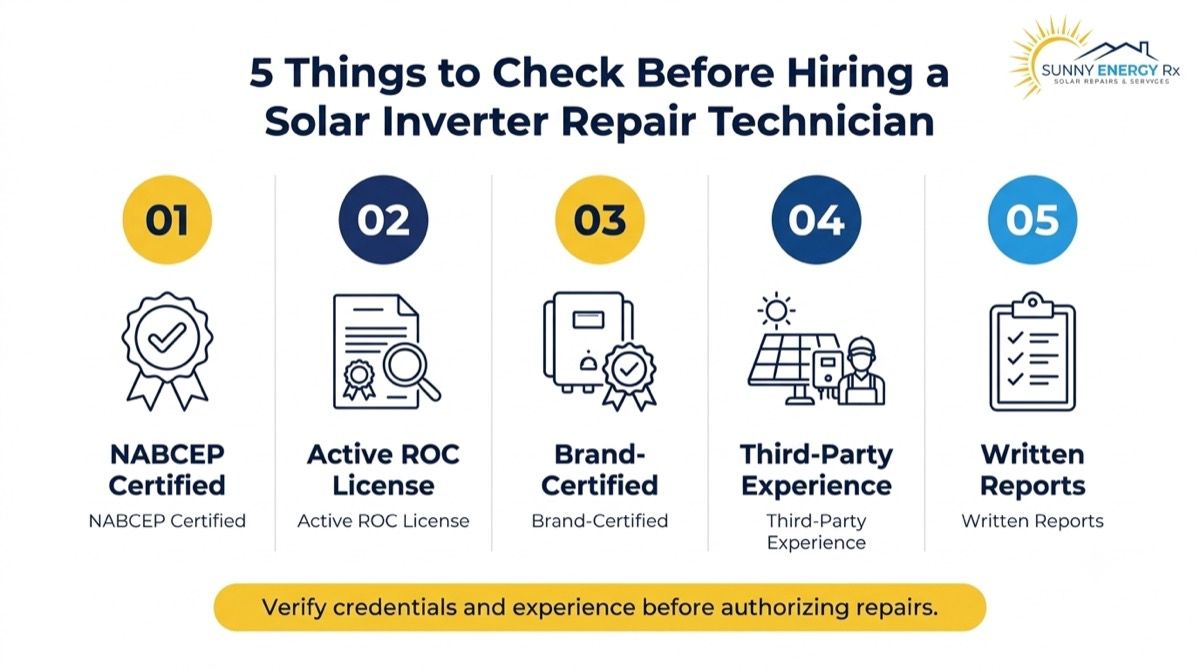
Fixing a “solar inverter not working” situation involves live electrical parts and warranty terms, so who you hire matters as much as the repair itself. Look for these:
NABCEP certification: Independent proof that the technician has been tested on solar installation and service.
An active Arizona ROC license: Confirm it is current on the Arizona Registrar of Contractors website, and that it covers the type of work you need.
Installer certification for your inverter brand: Some manufacturers require it for warranty work, so ask whether it applies to yours.
A record of servicing systems they didn’t install: Ask for examples, since working on someone else’s system takes different skills than working on their own.
Written documentation, with a production check after the work: The report should list what was found and changed, and confirm the system is producing before they leave.
Ask them to put the diagnosis in writing before any repair starts, along with a quote, so you can compare options and decide whether to repair or replace.
Conclusion: What to Do When Your Solar Inverter Is Not Working
A solar inverter not working is stressful, but it is rarely a mystery once you know what to look for. Read what the screen, lights and app are telling you. Record the code, the date and the label before anything changes. Route the problem to the right person, leaving anything inside the enclosure, on the roof or in the DC wiring to a certified technician. Then protect the system with monitoring, good airflow and a dated inverter records file.
In Arizona, heat, age and monsoon season make inverter trouble more likely, so a fault that returns after a reset deserves a proper diagnosis, not another reset. Whether the answer turns out to be a tripped breaker, a warranty replacement or a closed installer, the owners who document early get faster repairs and stronger claims.
Solar inverter not working, or need solar panel inverter repair or replacement, even if we didn’t install it? Call Sunny Energy RX at 480-470-1023.
Often, yes, but it depends on your city or county. Ask your local building department, or ask the technician to confirm before work begins. Get the answer in writing, so the job doesn’t stall at inspection or cause problems later.
Often, yes. Check your utility’s interconnection rules, or ask the technician to confirm. A replacement with different specifications may need the utility’s approval before the system is switched back on, so ask before the old unit comes off.
Usually, if voltage, current and configuration match. A technician must check compatibility, including optimizers and monitoring, before installing. Ask for that check in writing, since a mismatch can cause poor output, repeated faults or a warranty dispute.
It stops or drops, and your home keeps drawing grid power in the meantime. Keep your utility bills and records, since they document the lost production. Ask the manufacturer whether any compensation applies, and get the answer in writing.
Coverage depends on your policy and the cause, and the insurer makes the decision. Keep photos, codes, dates and a technician’s written findings, and ask your insurer what documentation it needs before you file a claim.
Contact your lease provider first. Don’t let anyone open the equipment without their approval, because unapproved work can breach your lease terms. Ask the provider who is authorized to service the system, and keep that answer in writing.
At least once a year, plus a monthly look at the app and the display. Heat is hard on inverters, so more frequent checks pay off on older units. A yearly check should include vents, mounting and airflow. See our maintenance guide.
Have photos of the display, lights and label, the fault code and date, your app screenshots, and any RMA or case numbers. Having these ready speeds up the diagnosis and often avoids a second call or a repeat visit.
Yes. We service and replace inverters on systems from any installer, including those left behind by closed companies. Call us with your inverter’s make, model and any fault codes, and we will tell you what to expect.
About the author
Joseph Cunningham
Published · Updated